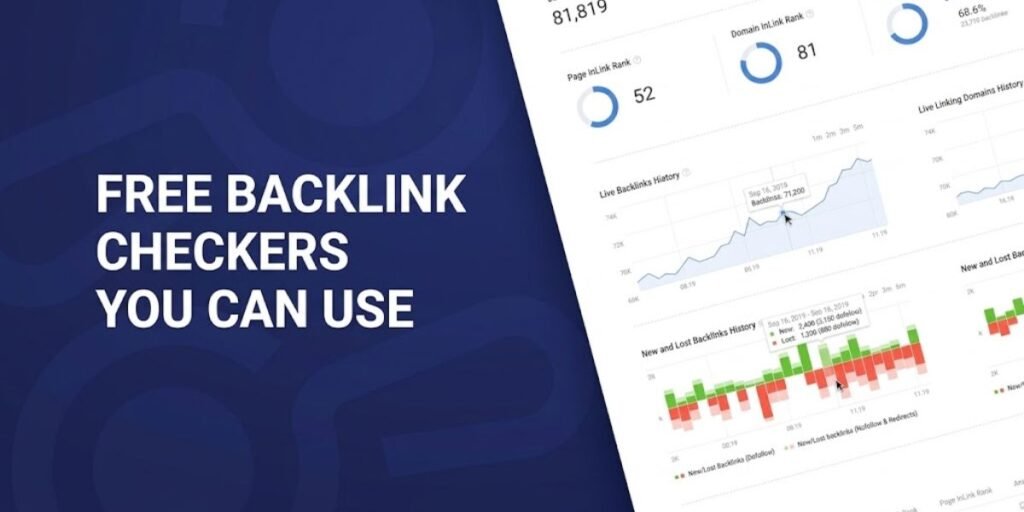
Backlink analysis shows which sites link to your pages, how your competitors earn their links, and where realistic link-building opportunities sit. The problem is that most serious SEO platforms put their link data behind a login or a paywall.
A handful of tools still let you type in a domain and see real data right away. Some run on very large, well-maintained indexes. Others are lighter utilities with smaller databases.
Free access always comes with limits. Expect capped result lists, daily check allowances, and locked exports. These caps change often, so confirm the counter on each tool page before you build a workflow around any of them.
This guide covers seven tools, what each one shows without registration, and where each one runs out of road.
1. Semrush Free Backlink Checker
Semrush offers a standalone backlink checker that works on any domain without an account. You enter a root domain or URL and get a high-level report within seconds.
The tool runs on the same database that powers Semrush Backlink Analytics. According to the Semrush free backlink checker page, that index holds more than 43 trillion backlinks from 390 million referring domains and is refreshed at least hourly. That scale is the main reason to start here.
The free report includes the domain’s Authority Score, total backlinks, referring domains, and the percentage of dofollow links. Below the summary sits a list of top backlinks. Each row shows the source page title, the URL, the anchor text, and the Authority Score of the linking page. Tags also mark each link as dofollow or nofollow, and as newly discovered or recently lost.
The catch is depth. You see a sample of the strongest links, not the full profile. Complete referring domain data, side-by-side domain comparison, filters by link type, country, platform, and authority, and report exports belong to the paid Backlink Analytics product.
A usage counter sits next to the search box, so you can see how many checks remain before you run one. Semrush says a free account unlocks more checks and more data. Anonymous visitors should plan on a small daily budget.
Where this tool earns its place is competitor triage. Run three direct rivals and compare Authority Score against referring domain count. A competitor with a mid-range score but a far larger set of referring domains usually points to a link campaign worth studying.
2. Ahrefs Free Backlink Checker
Ahrefs offers one of the most widely used free checkers, and it runs without an account. You paste a domain, URL, or subdomain and the tool returns a snapshot of its link health.
The data behind it is substantial. Ahrefs describes its index as the largest set of live backlinks anywhere, at over 15 trillion links, and states that fresh data arrives every 15 minutes. Its backlink checker page shows the headline metrics you get on a lookup, including Domain Rating (DR), Ahrefs Rank, the number of backlinks, and the number of referring domains.
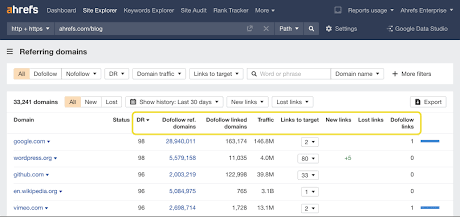
Each backlink entry in the free view is built around the referring page, the source URL, the follow status, and the anchor text. That is enough to judge whether a link is editorial, a directory listing, or a footer placement.
Published allowances differ by source and by year. A Search Engine Land roundup of free checkers described a list capped at the top 100 backlinks with no daily limit on checks. Ahrefs itself does not print a hard number on the page today, so treat any quoted figure as a snapshot of that moment.
The premium side is where the real gap opens. The page lists reports that need an account, such as growth and decline charts for referring domains, the full Linked Domains and Broken Links reports, and a 404 filter for finding heavily linked pages that no longer exist. CSV and PDF exports are also part of the paid product. The Starter plan is currently listed at $29 per month on that page.
If you own the site you are checking, there is a cheaper route. Ahrefs also runs a free plan for your own verified websites, which gives you backlink data on your own domain without a subscription.
3. BlazeHive Free Backlink Checker
BlazeHive is a lightweight lookup utility for people who want fast domain data without creating an account or entering card details. It is worth knowing that BlazeHive’s main business is different. Capterra lists it as SEO software built around content strategy and writing, so the backlink checker works as a side tool rather than the core product.
Submit a URL and the report focuses on a calculated domain authority score, a handful of live backlink highlights, the number of referring hosts, and explicit dofollow or nofollow tags.
The advantage is speed. You paste a link and see a surface-level link profile without leaving an email address behind.
The limitation is the allowance. The free tier applies a daily cap per browser on unique domains, and once you hit it, you wait until the next day or register to continue. The tool also draws on its own index, so expect numbers that differ from the larger crawlers.
My practical view is that this utility suits a quick first look. It should not be the only source behind a link building decision.
4. GrowthMarketing.ai Free Backlink Checker
GrowthMarketing.ai offers an accessible inspection tool for marketers who want to evaluate link profiles and anchor distribution without a formal sign-in.
The platform checks your domain against its internal link index and returns the overall volume of discovered links, unique referring domains, a simplified authority score, and sample anchor text.
One feature stands out in the free view. You can filter the results to separate dofollow links from nofollow ones, which many no-signup tools reserve for paid tiers.
The results reflect the platform’s own index rather than the entire web. Independent indexes vary widely in size, so the link counts here can differ sharply from those of larger enterprise crawlers. Unregistered users also get a fixed number of daily searches before access is capped.
For anchor text, a quick sample is often enough. If you see a profile dominated by exact match commercial phrases, that is the moment to open a bigger tool and dig deeper.
5. Sightivo Free Backlink Checker
Sightivo provides an instant domain audit that includes a free first backlink check, with no registration and no payment details.
That first report covers the essential off-page indicators. You get a preview list of active backlinks, a numerical domain trust score, the aggregate count of unique referring domains, and the internal pages that attract the most links.
Sightivo follows a strict first-check model for anonymous visitors. Your initial search returns metrics and sample link data immediately.
Run a second domain in the same browser session and rate limits kick in quickly. To keep searching or to export link records into a spreadsheet, you are prompted to register a free profile or buy a paid plan.
Because of that structure, Sightivo works best as a single-shot tool. Save the one anonymous check for the domain that matters most, which is usually your biggest competitor.
6. Seobility Free Backlink Checker
Seobility runs a dedicated free backlink checker that delivers real link data before you create an account. It suits webmasters who want a fast spot check of their own site or a competitor.
Its standout feature is Link Rating, a per-link percentage score that most free tools skip. The report also lists total backlinks, referring domains, and unique IP addresses. Each link carries attributes such as dofollow or nofollow, plus a content type label like text link or image link. A selection of top backlinks appears with the source page title, the destination URL, and the anchor text.
Reported limits vary. The older Search Engine Land roundup cited 400 backlinks per check and three checks per day. A more recent DEV Community comparison found it was possible to page through roughly 600 links on a large profile before hitting the ceiling. Both can be true at different points in time, which is the reason to test the tool yourself.
The free tool gives a reasonable impression of link quality. Full audits, backlink monitoring alerts, and complete site crawls require Seobility’s wider SEO suite.
7. Moz Link Explorer
Moz Link Explorer is one of the most established names in link research. It created metrics that became industry shorthand, including Domain Authority (DA), Page Authority (PA), and Spam Score.
Moz does not qualify as a strict no-registration tool. Link Explorer requires a free account, and that account must be verified by email before it works.
The free tier is small. The Next Web reported in March 2026 that a free Moz Community account gives permanent access to limited versions of Link Explorer and Keyword Explorer, at 10 queries per month for each, with no credit card. Reliablesoft’s testing put the data at 50 rows per query.
Within that allowance, you get linking domain counts, anchor text distribution, top linked pages, and competitor link comparisons.
If you are unwilling to register or share an email address, Moz is not a fit. Use Ahrefs or Semrush instead. If you are willing to register, treat the monthly allowance like a budget and spend it on your own domain and your two toughest competitors.
What Backlink Information Can You See for Free?
Free tools vary in how much they show without an account, but the core metrics are consistent. Knowing what each one means keeps you from misreading a thin report.
- Total backlinks: The count of individual links pointing at a site in that tool’s database. It is the easiest number to inflate and the least useful on its own.
- Referring domains: Unique websites that link to you. One hundred links from one hundred separate domains carry far more weight than one hundred links from a single site, so this figure is usually the better benchmark for comparing yourself with competitors.
- Linking page: The specific URL where the link lives. Looking at it tells you whether the link sits inside an editorial article, a resource list, a comment section, or a sitewide footer.
- Anchor text: The visible clickable wording. A natural profile mixes branded phrases, bare URLs, and descriptive text. A profile heavy on exact match commercial anchors deserves a closer look.
- Dofollow and nofollow tags: Describe the link attribute. Google moved nofollow from a strict directive to a hint in March 2019, so a nofollow link is not automatically worthless. It simply does not behave like a standard editorial endorsement in the way the tags suggest.
- Authority metrics: Proprietary scores such as Ahrefs DR, Semrush Authority Score, and Moz DA. They are third-party estimates, not ranking factors used inside Google’s algorithms. Do not chase them for their own sake.
If you own the site, add one more free source to your routine. Google Search Console has a Links report with top linking sites, top linked pages, and top linking text. Google notes that it shows a sample of links, and some URLs can be omitted for reasons such as non-indexed pages or deduplicated URLs. Used alongside a third-party checker, it gives you a ground truth that no outside tool can match for your own domain.
Why Free Backlink Checkers Show Different Results
Enter the same domain into three tools, and you will usually get three different link counts. That is normal, and it comes from how each platform collects and presents data.
Every major vendor runs its own crawler and stores its own index. Ahrefs, Semrush, and Seobility discover and record links independently, so overlap is partial by design. Semrush even lists the question of why its numbers differ from other tools and from Google Search Console in its own FAQ.
Crawl frequency matters too. Ahrefs says its index updates every 15 minutes and Semrush says at least hourly, but smaller platforms may refresh far less often. A link published this morning can show up in one report and be missing from another for weeks.
Free reports are also truncated by design. A tool might hold tens of thousands of links for a domain and display only a top sample. You are seeing a ranked slice, not the full set.
Filtering rules add another layer of difference. Semrush states that it removes duplicate links and filters obvious noise before showing data. One tool may drop sitewide links or low-quality directory links that another keeps.
Finally, links die. A page recorded months ago may have been deleted, redirected, or blocked since. Tools that clean their data more aggressively will show lower, more current numbers.
The sensible approach is to compare patterns rather than totals. Run two or three checkers on the same domain and look for referring domains that appear in more than one report. Those are the links most likely to be real and active. Use your free reports as a starting snapshot to spot major link sources, anchor text habits, and competitor movements, then verify anything important by visiting the linking page.
Understanding how SEO tools collect, crawl, and report data can help you interpret backlink results more accurately and build a more reliable optimization workflow. If you want to explore other tools and resources for improving your website’s search performance, take a look at these related articles:
- Best SaaS Tools for Technical SEO Used by Experts in Their Stack
- Best SaaS Tools for On-Page SEO and AI Content Optimization in 2026
- Technical SEO Audit Checklist for Finding and Fixing Site Errors
Frequently Asked Questions
Can I check backlinks without registering?
Yes. Semrush, Ahrefs, and Seobility all let you enter a domain and view an initial report without an account. Moz is the exception here because it requires a verified free account before Link Explorer works.
Are free backlink checkers accurate?
They are accurate for what they have indexed, but incomplete by nature. Each tool relies on its own crawler schedule and shows a truncated slice of its data, so no single report captures every link that exists. Cross-checking two tools and your own Search Console data gives a far more reliable picture.
Can I check competitor backlinks for free?
Yes. You can enter any public domain into the no-signup tools above and see its authority metrics, top backlinks, referring domain counts, and anchor text samples. For deeper competitor work, such as full link lists or link gap analysis, you will need a paid plan.
Do free backlink checkers show all backlinks?
Rarely. Most display only a top sample, and the size of that sample varies by tool and over time, from a few dozen entries to a few hundred at best. Complete link databases, filters, and exports sit behind account upgrades.
Do I need to pay for backlink analysis?
Not always. Free checkers handle basic lookups, quick spot checks, and light competitor research well. Paying makes sense when you run outreach campaigns, need complete CSV exports, track new and lost links over time, or perform full backlink audits. For a site you own, Google Search Console and Ahrefs’ free plan for verified sites cover a lot of ground at no cost.