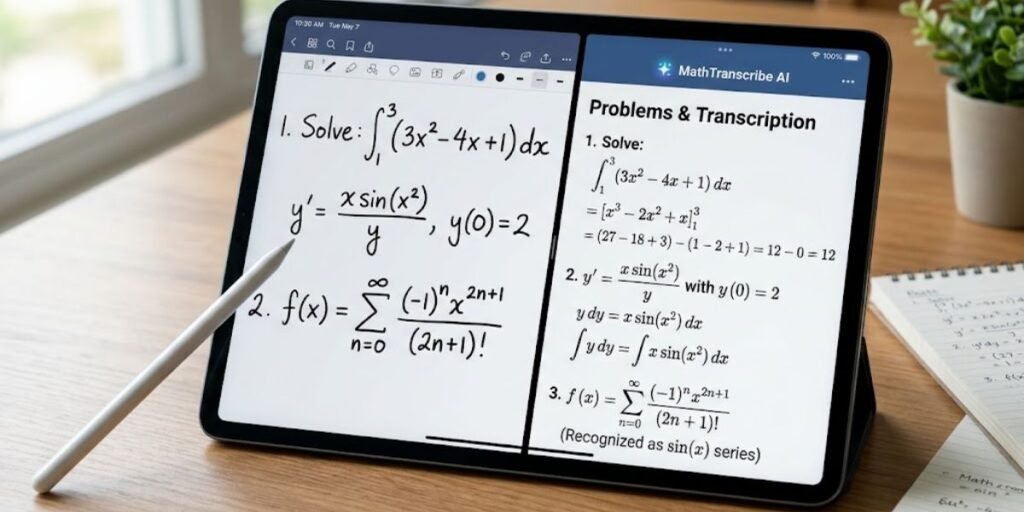
Converting handwritten mathematics into clean digital text requires far more advanced processing than traditional optical character recognition engines can provide. Standard document scanning software reads linear text streams, but mathematical notation depends entirely on strict spatial relationships. Fractions require recognizing numerators positioned above denominators separated by a horizontal rule, exponents demand accurate superscript placement, and matrices rely on structured rows and columns. When symbols overlap, or stroke alignments vary across a handwritten page, generic text recognition tools frequently fail.
Specialized mathematical transcription platforms bridge this gap by leveraging neural networks trained specifically on geometric symbol arrangements. These tools analyze handwritten equations, notes, and multi-line derivations to generate structured code formats suitable for academic publishing, digital note-taking, and software development. This guide examines five leading options designed to recognize handwritten mathematical content and convert it into usable digital output.
Best AI Tools for Transcribing Handwritten Math Problems
1. Mathpix Snip
Mathpix Snip stands out as an industry standard for recognizing complex handwritten equations and mixed text-and-math documents. The platform captures handwritten inputs from tablets, mobile devices, or desktop screen clippings and translates them instantly into multiple formats. Users can export recognized content directly as LaTeX, MathML, AsciiMath, or Mathpix Markdown, making it exceptionally versatile for academic research and publishing workflows.
The tool excels at handling complete documents containing mixed paragraphs, embedded inline formulas, and large multi-line matrices. Whether digitizing rough laboratory notebooks, lecture notes, or textbook pages, the underlying recognition engine maps complex spatial layouts with high fidelity. Its multi-platform availability across iOS, Android, desktop apps, and web browsers ensures seamless integration into daily academic routines.
2. MyScript Math
MyScript Math focuses on an interactive, pen-based mathematical workspace powered by advanced digital ink recognition. Rather than processing static snapshots, the platform interprets handwriting dynamically as the user writes with a stylus on a compatible tablet or touch screen. This allows individuals to write natural mathematical expressions by hand and watch them convert into clean digital text in real time.
Users can easily edit recognized equations by crossing out mistakes, writing over characters, or inserting missing terms directly within the workspace. Once captured, mathematical notes export seamlessly as vector PDFs or copy-pasteable expressions in LaTeX. It is important to distinguish its real-time handwriting transcription and interactive math scratchpad capabilities from automated equation-solving engines, as its primary purpose is accurate translation and note organization.
3. WriteTex
WriteTex provides an AI-powered workflow designed specifically to convert handwritten mathematical expressions into clean LaTeX and Markdown. The platform caters primarily to students and researchers who write formulas using an Apple Pencil or other supported digital styluses on tablet devices.
The application streamlines the process of moving handwritten derivations into technical documentation or code editors. Users write expressions naturally, and the system translates the handwritten strokes into standardized mathematical markup. The tool is optimized for rapid equation conversion rather than functioning as a full-page worksheet OCR scanner, making it ideal for drafting equations on the fly while working in technical documents.
4. ImageToLaTeX
ImageToLaTeX specializes in converting handwritten mathematical expressions and captured images into editable LaTeX syntax and standard word processor equations. The platform provides a straightforward pipeline where users upload a photo or screenshot of a handwritten formula and receive an immediate digital translation.
The intended workflow suits researchers, educators, and students who need quick formula conversions without installing heavy desktop software. Verifying current feature updates, availability, and output formatting options ensures that formulas integrate smoothly into target documents such as Microsoft Word equations or LaTeX compilers.
5. Pix2Text
Pix2Text offers an open-source OCR option capable of recognizing complex mathematical formulas and extracting structured content from images or document pages. Built on modern deep learning architectures, the open-source library processes multi-line text and math blocks for developers and technical users looking to integrate equation recognition into custom pipelines.
While the tool handles general document layout analysis effectively, its handwritten recognition performance depends heavily on image clarity and input training data. It serves as a powerful solution for technical users wanting local control over their processing workflows, though specialized commercial tools may offer higher out-of-the-box accuracy for messy handwriting.
How to Choose the Right Tool for Your Handwritten Math
Selecting the optimal AI transcription platform depends on your specific document structure, input hardware, and output destination. Evaluating your daily workflow against specialized feature sets prevents friction during transcription.
To match your specific requirements with the appropriate software, consider these primary use cases:
- Individual Equations: When converting single formulas, standalone derivations, or isolated problems into editable notation, lightweight converters like ImageToLaTeX or mobile screen-clipping utilities provide rapid conversion without requiring full document processing.
- Complete Pages of Notes: For lecture notes, research logs, or problem sets that mix handwritten prose with embedded mathematical formulas, Mathpix Snip offers robust document-level spatial parsing to keep text and equations correctly aligned.
- Academic Writing: If your primary destination is an Overleaf project, an Obsidian vault, or a LaTeX document, platforms like WriteTex and Mathpix Snip output clean, compile-ready markup that eliminates manual code cleanup.
- Digital Handwriting: For users who prefer writing with a stylus on a tablet, real-time digital ink platforms like MyScript Math allow dynamic editing, immediate formula conversion, and interactive mathematical exploration as you write.
- Open-Source Workflows: Developers and technical teams seeking self-hosted systems or pipeline integration can deploy Pix2Text, using its open-source Python libraries to build automated image-to-Markdown processing.
How to Get More Accurate Transcriptions From Handwritten Math
Even advanced neural networks require clear visual inputs to differentiate lookalike mathematical symbols. Modifying your capture technique and writing habits significantly improves initial recognition accuracy.
Applying these operational practices minimizes optical recognition errors during document scanning:
- Ensure Uniform Lighting and Sharp Focus: Photograph or scan handwritten pages under bright, shadow-free lighting. Low contrast and motion blur obscure critical details like fraction bars, matrix brackets, and decimal points.
- Maintain Clear Spatial Relationships: Keep numerators, denominators, exponents, and subscripts distinct. Ensure fraction bars are drawn horizontally and extend beneath the entire numerator to prevent ambiguity.
- Isolate Complex Formula Blocks: When surrounding scratch work or stray margins interfere with recognition, crop the image tightly around the target expression before processing.
- Distinguish Ambiguous Symbols: Write variables and operators with distinct strokes. Indistinct handwriting often causes AI engines to confuse a lowercase x with a multiplication operator, a superscript 2 with a subscript 2, or a letter z with the digit 2.
- Preserve Multi-Line Alignment: Maintain vertical alignment across consecutive steps in multi-line derivations to ensure the AI parses equality signs and structural breaks correctly.
To understand why stroke precision matters, consider how a minor recognition error changes mathematical meaning. A misplaced character can easily transform x^2 + 1 into x_2 + 1 or read a square root symbol sqrt(x) as a simple division bracket, completely altering the downstream calculation.
What to Check Before Using a Transcribed Equation
Never insert transcribed output into a manuscript, homework submission, or software program without thorough verification. Optical transcription engines process visual geometry, not semantic truth.
Before reusing digitized mathematical content, complete these verification steps:
- Verify Symbol Accuracy: Check that Greek letters, summation limits, integrals, and specialized operators match the handwritten source exactly.
- Inspect Structural Formatting: Confirm that fraction hierarchies, matrix dimensions, and nested parentheses are rendered without broken syntax or missing brackets.
- Distinguish Transcription from Logic: Remember that an accurate visual transcription simply copies your handwriting; it does not correct underlying mathematical errors in your original work.
- Validate Platform Compatibility: Test the generated LaTeX, MathML, or Word equation code in your destination editor to catch rendering bugs or missing packages before publication.
Conclusion
Digitizing handwritten mathematics effectively requires matching your workflow to the right AI transcription tool. Complete document OCR platforms like Mathpix Snip handle complex, full-page research notes, while dedicated equation converters like WriteTex and ImageToLaTeX streamline quick formula insertion into technical documents. Dynamic tools like MyScript Math transform the tablet drawing experience into a real-time mathematical environment, while open-source projects like Pix2Text give developers the flexibility to build custom recognition pipelines.
By maintaining legible handwriting, optimizing image capture conditions, and systematically auditing the output, you can eliminate manual typing and build an efficient bridge between handwritten mathematics and digital publishing.
If you are also exploring AI-powered development tools and ways to make coding more accessible, the following articles cover MCP integrations, design-to-code workflows, and coding tools for different skill levels: