An employee receives a customer inquiry through an incoming message queue, opens the customer relationship management software to check account history, searches a separate repository for relevant technical documentation, drafts a reply, updates an internal tracking spreadsheet, and forwards the unresolved portion of the request to another department. Each individual action is straightforward and requires standard operational knowledge, yet the entire process consumes noticeable time simply because information and responsibility must move between people and disparate software applications.
This operational friction is precisely where AI agents are changing how modern companies handle daily work.
Unlike basic chatbots that simply answer isolated questions, autonomous or semi-autonomous agents can handle multi-step business workflows involving information gathering, logic-based decisions, and execution across connected enterprise systems. Depending on their configuration, permission boundaries, and supervision models, they can complete routine sequences independently while routing complex exceptions to human personnel.
This guide explores seven practical applications, analyzes how agents fit into existing corporate operations, evaluates deployment costs and operational risks, and provides a framework for deciding where your organization should start.
What Are AI Agents, and How Do They Automate Business Workflows?
To understand how agents transform business processes, we must first separate them from traditional automation tools and basic conversational assistants.
An AI agent is a software system powered by a foundational machine learning model that interprets a stated business goal, interacts with relevant data sources, selects appropriate tools, and executes a sequence of actions to complete a task. More advanced architectures can plan multistep workflows, adapt when encountering unexpected variables, and safely escalate conditions that fall outside their operational parameters.
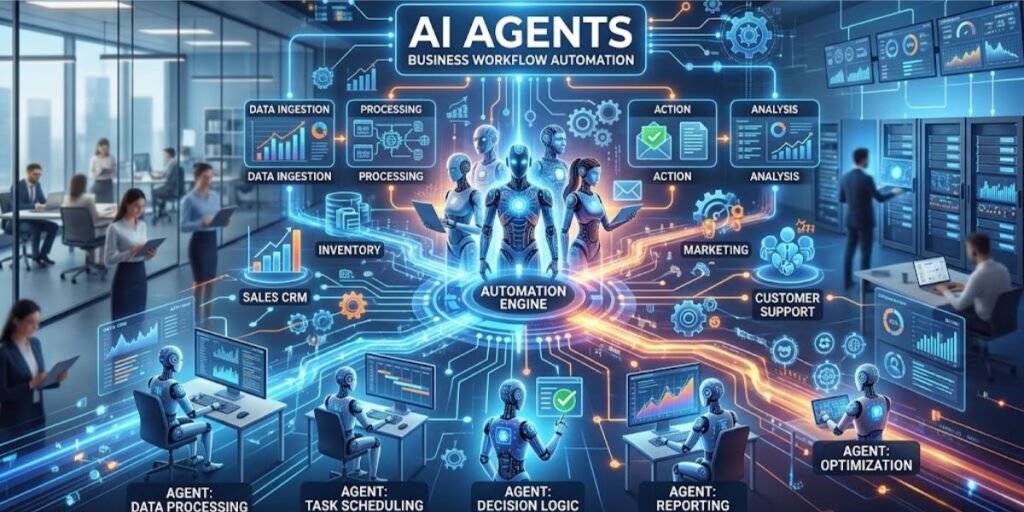
A typical business workflow involves an incoming request, data collection, decision logic, an action within an enterprise application, and a final confirmation. An AI agent participates across several of these stages simultaneously.
For instance, consider a customer asking about an upcoming delivery schedule. An agent identifies the order number from the communication, queries the company inventory and logistics management system for real-time tracking data, checks delivery milestones against established SLAs, and drafts a precise response. If the database indicates a significant transit delay, the system flags the transaction for a human support supervisor rather than issuing an unsupported promise to the client.
Comparing Automation Approaches
Understanding the functional boundaries of different automation tiers helps prevent costly architectural mistakes.
- Traditional Automation: Executes rigid, predefined rules and sequential logic without contextual interpretation. Business Example: Sending an automated invoice payment reminder precisely three days after the established due date.
- AI Assistant or Chatbot: Generates content, answers static questions, or assists an employee in drafting text. Business Example: Helping a customer service representative draft a polite response to a complex client complaint.
- AI Agent: Utilizes dynamic context, API connections, and tool selection to execute permitted actions toward a broader goal. Business Example: Reviewing a multi-part customer request, retrieving relevant account metrics from enterprise software, updating the support ticket, and routing financial exceptions to the appropriate team.
These categories frequently overlap within modern architectures. A mature workflow often combines traditional rules for predictable steps, large language models for unstructured text interpretation, and agentic orchestration for managing actions across applications.
As IBM’s enterprise AI research highlights, agentic workflows differ fundamentally from static automation because they possess the capability to plan, execute, and adapt during multistep execution. However, this flexibility means agents require strict operational guardrails and well-defined API boundaries to function reliably in production environments.
7 Practical Ways to Bring AI Agents Into Your Business Workflows in 2026
1. Automate Email Triage and Routine Follow-Ups
Email remains the primary operational channel for receiving customer inquiries, assigning internal tasks, exchanging project documents, and managing client relationships. However, manual inbox management consumes hours of staff time that could be dedicated to high-value work.
An AI agent can classify incoming messages by intent, extract vital metadata, identify the associated customer record, draft routine replies, and generate follow-up tasks inside an enterprise project board. With proper integrations and restricted write permissions, it can also update customer records or route specialized requests directly to the correct department.
For example, a regional logistics firm receives hundreds of supplier and client emails daily. An agent parses the incoming stream, separates new service quotes from billing disputes and delivery complaints, pulls historical account data, drafts responses for standard status check-ins, and escalates sensitive operational failures to human managers.
The objective is not to allow software to answer every incoming email blindly. Rather, it is to eliminate the administrative friction of sorting messages and drafting standard replies. Human oversight remains mandatory when messages involve contractual commitments, financial refunds, sensitive compliance disclosures, or volatile customer complaints.
2. Keep Sales Leads and CRM Records Up to Date
Sales operations depend on timely data entry, yet prospect research and CRM updates are frequently delayed because sales representatives prioritize client calls over administrative recordkeeping.
An agent can research incoming leads using approved public data sources, synthesize company background information, prepare structured lead profiles, identify missing data fields, and draft personalized outreach messaging. Depending on CRM permissions, it can automatically populate contact fields and schedule internal reminders.
When a prospective client submits an inquiry through a web form, the agent ingests the submission, queries the CRM to check for existing account history, highlights missing qualification metrics, and compiles a briefing summary for the assigned account executive. Following a sales call, the agent can ingest meeting notes, organize key discussion points, and draft custom follow-up materials for human review.
Sales organizations must enforce strict verification boundaries here. Agents must never invent prospect details or present unverified web research as confirmed corporate data. Automated lead status changes require strict validation rules to prevent pipeline corruption.
3. Handle Routine Customer-Support Requests
Customer service departments present a compelling environment for deployment because support operations require pairing information retrieval with action execution.
An agent interprets inbound technical or account queries, searches indexed internal knowledge bases, retrieves live order tracking metrics, categorizes issue severity, and prepares resolution actions. When queries fall within pre-approved operational policies, the system resolves the ticket directly or issues standard updates.
For instance, if a client reports a delayed shipment, the agent queries logistics systems, identifies transit bottlenecks, determines whether the event violates delivery parameters, and generates a structured update. If account records reflect conflicting data or the client requests custom financial compensation outside standard policy, the case escalates to human specialists along with a compiled history brief.
This architecture depends heavily on the accuracy of underlying company documentation. An agent cannot reliably resolve customer issues if product manuals, return policies, or shipping guidelines are outdated or contradictory.
Real-world deployments demonstrate the operational impact of this approach. Google Cloud’s AI Agent Trends Report highlights how industrial manufacturer Danfoss deployed AI agents powered by Go Autonomous technology to automate email-based B2B order processing across global operations. The company reported automating up to 80% of transactional decision-making and reducing average customer response times from 42 hours to near real time. While individual organizational results vary based on data readiness, this demonstrates how connecting agents directly to transactional workflows streamlines B2B operations.
4. Process Invoices and Organize Financial Documents
Finance and accounting teams manage documents arriving in disparate formats that must be systematically validated against enterprise resource planning (ERP) records, purchase orders, and internal compliance matrices.
An agent extracts structured line items from incoming digital invoices, identifies associated vendor accounts, cross-references purchase order numbers, flags discrepancies, and prepares ledger entries for approval inside accounting platforms.
Consider a standard accounts payable scenario: a vendor submits a PDF invoice via email. The agent parses the document, extracts invoice numbers, line items, and due dates, validates the data against open purchase orders, and routes matched items directly into payment queues. If line items exceed approved thresholds or lack matching purchase orders, the agent flags the exception and routes it to an accounting manager.
Organizations must maintain clear boundaries between document processing and financial authorization. While an agent can prepare invoice entries and run validation checks, it should never possess autonomous authority to disburse funds or approve bank transfers independently. Dual-control mechanisms and approval thresholds remain mandatory for financial security.
5. Turn Meetings and Project Updates Into Follow-Through
Many organizations utilize automated transcription tools to summarize internal meetings, but operational breakdowns often occur after the meeting ends when actionable decisions fail to reach project management software.
An agent bridges this gap by parsing raw meeting transcripts, isolating agreed-upon deliverables, identifying designated owners, creating corresponding tasks inside tools like Jira or Asana, and drafting follow-up summaries for participants.
Following an engineering review, an agent identifies agreed technical tasks, maps deadlines against current sprint schedules, drafts work tickets for project lead review, and updates project status boards once human approval is granted.
This deployment requires clear validation protocols. Meeting transcripts frequently contain casual suggestions or preliminary ideas that were never formally ratified as deliverables. Agents must require human confirmation before assigning tasks or altering project timelines based on conversational text.
6. Speed Up Employee Onboarding and Internal Requests
Human resources and IT helpdesk teams spend considerable time executing recurring administrative steps for new hires, hardware provisioning, software permissions, and internal policy inquiries.
An agent coordinates information collection during onboarding, checks submitted documentation, prepares provisioning checklists, submits approved software access tickets, and monitors completed steps across departments.
When a new employee joins an organization, the agent collects required tax and identity documentation, verifies submission completeness, triggers IT equipment requests based on role templates, and answers standard policy questions using approved HR handbooks. Complex personal matters or benefits exceptions escalate directly to HR professionals.
Strict data privacy controls are essential. HR workflows involve sensitive personally identifiable information (PII). Agents participating in employee onboarding must operate under restricted access protocols to ensure sensitive employee records are protected.
7. Connect Multiple Apps to Move a Workflow From Start to Finish
The previous examples focus on specific business functions. The broader strategic value of agentic architecture emerges when orchestrating multi-application workflows that span across enterprise silos.
Processing a new enterprise customer order might require an agent to execute an interconnected sequence:
- Parse the incoming order document from a client email.
- Query the CRM to pull client credit parameters and account status.
- Check real-time inventory levels across warehouse databases.
- Generate a formal sales order inside the primary ERP software.
- Request human approval if custom pricing overrides apply.
- Send an order confirmation and track logistics execution.
Multi-app orchestration delivers operational speed, but it also increases architectural complexity. A failed integration or corrupted data point early in the sequence propagates errors downstream. Organizations building multi-system agent workflows should begin with bounded, highly audited processes with explicit error-handling paths for failed API calls.
What Should You Automate First in Your Business?
Deciding where to introduce agentic automation requires evaluating operational impact against technical complexity rather than selecting the most impressive AI demo.
A practical evaluation framework measures four operational variables:
- Transaction Frequency: How often does the process occur on a daily or weekly basis?
- Manual Effort: How many staff hours are currently consumed by data transfer and sorting?
- Process Standardization: Are inputs, decisions, and required outputs clearly defined by existing procedures?
- Error Impact: What are the operational, financial, or legal consequences if a step fails?
High-frequency, highly standardized tasks with low error impact—such as classifying routine internal support tickets or drafting standard customer follow-ups—make ideal initial projects. Conversely, low-frequency tasks with high error impact—such as capital expenditure approvals or legal contract executions—should remain under direct human management.
How to Bring AI Agents Into Your Existing Business Systems
Moving an agentic workflow from a controlled demonstration to a reliable production system requires methodical engineering and strict operational controls.
1. Map the Process Before Configuring the Agent
Document how the target workflow is currently executed across your organization. Identify every application involved, specify exact data inputs, locate human decision gates, and define exception scenarios.
Operational problems often stem from inconsistent data formats or redundant handoffs rather than a lack of software capability. Systematically mapping the workflow reveals whether process optimization must precede software deployment.
2. Connect Only Necessary Enterprise Systems
Limit the agent’s software integrations strictly to the APIs and databases required for its defined role. Connect the system using secure protocols, scoped API keys, and Role-Based Access Control (RBAC) mechanisms.
Granting an agent unrestricted database read/write access creates significant operational and security risks. IBM’s operational guidance for enterprise AI deployment stresses establishing strict continuity of user context across platforms, maintaining granular workflow controls, and ensuring complete audit traceability for every action executed by an agent.
3. Establish Permission Boundaries and Approval Gates
Explicitly categorize actions into three distinct operational buckets:
- Autonomous Execution: Low-risk, standardized tasks the agent can complete independently, such as querying order statuses or updating internal ticket tags.
- Human-in-the-Loop Approval: Conditional actions requiring explicit employee sign-off before execution, such as issuing client refunds, altering project delivery dates, or dispatching external vendor communications.
- Prohibited Actions: High-risk operations the agent is strictly barred from performing, such as modifying master banking records or approving capital expenditures.
4. Test Operational Exceptions and Edge Cases
Validate system behavior using corrupted, incomplete, and adversarial data inputs before deploying to live environments. Test scenarios involving unavailable third-party APIs, missing record fields, ambiguous customer text, and conflicting database entries.
An agentic system that performs flawlessly on clean test data may exhibit unexpected behavior when encountering messy, real-world operational records.
5. Introduce Automation Gradually
Roll out agentic workflows in controlled stages. Begin with a limited group of internal users, monitor execution metrics closely, resolve operational edge cases, and expand permissions only after the system demonstrates consistent reliability.
What Does AI Workflow Automation Cost, and How Can You Measure Its Value?
Evaluating the financial viability of agentic automation requires balancing total deployment costs against verifiable operational returns.
Understanding Cost Components
Deployment expenses extend beyond platform software subscriptions. A complete financial assessment must account for:
- API and Model Inference Fees: Token consumption costs associated with underlying large language models.
- Integration and Infrastructure Engineering: Internal staff hours or external consulting fees required to build and maintain secure API pipelines.
- Maintenance and Monitoring: Ongoing expenditure for software updates, prompt adjustments, and system performance evaluations.
- Human Oversight Costs: Staff hours dedicated to reviewing pending agent actions, handling escalated exceptions, and correcting errors.
Calculating Operational ROI
To determine whether a specific workflow justifies automation, measure the baseline cost of human labor against projected operational savings.
Consider a practical scenario: a company processes 1,000 routine vendor inquiries monthly, with employees spending an average of 6 minutes per request. This represents 100 hours of monthly labor.
If an agentic system automates basic data retrieval and response drafting—reducing average human handling time by 50% inclusive of exception review—the organization recovers 50 hours of productive staff capacity per month.
To maintain financial oversight, track these core operational metrics:
- Cycle Time Reduction: Total time elapsed from initial request receipt to final task completion.
- Error and Rework Rates: Percentage of automated transactions requiring manual correction or reprocessing.
- Human Intervention Percentage: Proportion of total workflow instances escalating to human personnel.
- Total Cost per Transaction: Fully loaded cost per completed task, including infrastructure, API usage, and residual human labor.
As enterprise technology analysts at Forrester observe, an estimated 25% of planned enterprise AI spend will be deferred due to ROI concerns when organizations fail to link deployments to defensible financial models. Successful implementations tie agent capabilities directly to measurable improvements in operational cycle times, error reduction, and capacity creation.
Where AI Agents Can Go Wrong in Business Workflows
Deploying autonomous software across production systems introduces specific operational risks that require active governance and ongoing monitoring.
- Contextual Misinterpretation and Hallucinations: Agents may misread unstructured text, query incorrect database records, or generate responses based on outdated documentation.
- Excessive System Permissions: Providing agents with broad API access exposes enterprise systems to accidental data modification or unauthorized information disclosure.
- Cascading Integration Failures: Downstream errors can compound rapidly across multi-application workflows if an unhandled API error or corrupted data point is passed along to connected systems.
- Hidden Human Review Costs: If an agent yields high error rates or generates ambiguous outputs, staff may spend more time auditing work and correcting mistakes than executing the manual process directly.
- Unclear Accountability and Governance: Ambiguity regarding who owns an agent’s decisions can lead to delayed incident responses when automated actions result in financial or client discrepancies.
To mitigate these operational failure points, enterprise architectures must incorporate continuous system logging, automated anomaly detection, clear human escalation paths, and an accessible kill switch mechanism that allows administrators to halt automated operations instantly if unexpected behavior occurs.
Read More: 10 Best AI Agents for Small Business Automation in 2026
Frequently Asked Questions
Can AI agents automate an entire business workflow end-to-end?
Yes, certain standardized, digital-only processes can run autonomously. However, most enterprise workflows require human approval gates at key decision points, particularly when tasks involve financial commitments, legal liabilities, or sensitive customer interactions.
What is the primary difference between AI agents and traditional workflow automation tools?
Traditional automation tools follow rigid, predefined rule sequences without interpreting context. AI agents utilize large language models and reasoning frameworks to interpret goal statements, analyze unstructured inputs, dynamically select tools, and adapt execution paths when variables change.
Can small and mid-sized businesses implement AI agents effectively?
Yes. Smaller organizations can deploy pre-built agentic capabilities integrated into existing SaaS platforms (such as CRMs or helpdesk software) rather than engineering custom multi-agent frameworks from scratch. Starting with focused, high-frequency processes minimizes risk while delivering immediate capacity.
Should an AI agent be granted access to all enterprise databases?
No. Organizations should enforce the principle of least privilege, providing agents access exclusively to the specific data tables, endpoints, and applications strictly necessary to perform their assigned workflow.
How long does it take to deploy an AI agent workflow in production?
Timeline expectations vary based on architectural scope. A pre-built agentic integration handling a single bounded workflow can be deployed in a few weeks, whereas multi-application custom enterprise systems requiring deep API integration, security reviews, and extensive testing typically take several months.