I never pick a keyword based on its difficulty score alone. A tool might rate a term as easy, but if page one is full of brand homepages, government sites, and big marketplaces, a new article from a smaller site is not going to get in there anytime soon. I have lost months of content budget to keywords that looked easy on paper.
The tools themselves admit this. Mangools, whose whole product is built around keyword difficulty, tells users to never rely on a single number from a keyword tool and to always check the SERP. Ahrefs explicitly states that its KD score does not consider on-page factors and should only be the first filter in your research.
So I use difficulty scores to build a shortlist, and then I look at the actual search results. I check which sites hold the top ten positions, how many referring domains point to those exact URLs, what the searcher wants, and how many clicks are left after ads, AI Overviews, and answer boxes take over the screen.
Keep in mind that scores from different tools cannot be compared. A KD of 40 in Ahrefs and a KD% of 40 in Semrush are calculated with completely different formulas and different link databases. Always compare keywords inside one tool only.
Here are the ten tools I use, how each one measures competition, and what I actually use them for in practice.
1. Semrush
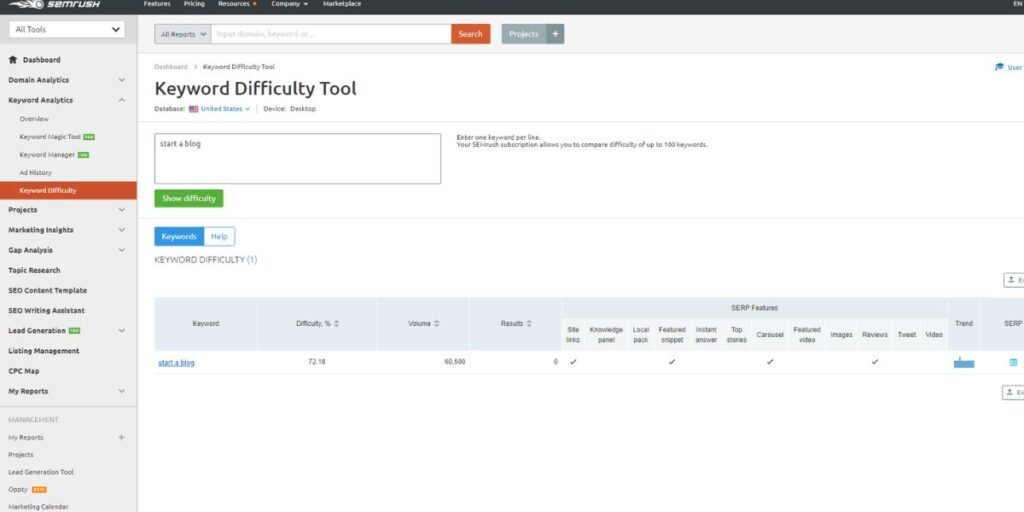
I do most of my keyword research in Semrush, mainly in Keyword Overview and the Keyword Magic Tool. Its Keyword Difficulty (KD%) score goes from 0 to 100. According to the Semrush knowledge base, it is based on the median number of referring domains to the ranking URLs, the median dofollow-to-nofollow ratio, the median Authority Score of the ranking domains, and SERP features for that keyword. Semrush rebuilt this formula back in 2021.
Semrush splits the score into six specific competition levels. For a score between 0 and 14 (Very Easy), you usually just need a good page with no links. Scores from 15 to 29 (Easy) require quality content that matches intent. Between 30 and 49 (Possible), you need well-structured content and some links. Scores from 50 to 69 (Difficult) call for a fair number of referring domains. From 70 to 84 (Hard), you need many quality backlinks and strong optimization. Finally, scores from 85 to 100 (Very Hard) demand serious link building and active promotion.
For a new or low-authority site, I stick to keywords under 30. Between 30 and 69, I plan for both a strong page and deliberate link building. Above 70, I only go after a keyword if the site already has solid authority in that topic.
Semrush also tags every keyword with one of four search intent types: informational, navigational, commercial, or transactional.
The feature I use most is Personal Keyword Difficulty (PKD%). Regular KD% is the same for every site. PKD looks at how relevant your domain is to the keyword and how your site compares with the domains already ranking. For a site with a lot of existing content on a topic, a keyword with KD% 45 can turn out much easier than it looks at first glance.
The SERP Analysis table in Keyword Overview lists every ranking URL with its Page Authority Score, the domain’s Authority Score, referring domains, and estimated traffic. It also shows which SERP features are present, including Featured Snippets, People Also Ask, and AI Overviews. You can filter for keywords that trigger AI Overviews in the Keyword Magic Tool and see which pages the overview cites. When a page loses traffic, the Changes on SERP filter tells you whether a new SERP feature took the clicks or a competitor did.
Semrush also provides paid search data. If a keyword has a high KD% and high Competitive Density, advertisers are paying top dollar for it, and the first organic result is probably pushed far down the page.
2. Ahrefs
For backlink questions, I go straight to Ahrefs. The Keyword Difficulty (KD) score in Keywords Explorer is based on one thing only: the number of referring domains linking to the top 10 ranking pages. Ahrefs notes on its KD documentation page that the score estimates your chance of reaching the top 10, not position one.
The useful part is that Ahrefs publishes how many referring domains each KD level roughly needs. A KD of 0 needs 0 referring domains. KD 10 needs about 10, KD 20 needs around 22, KD 30 needs roughly 36, and KD 40 requires about 56. As difficulty climbs, KD 50 needs around 84 referring domains, KD 60 needs 129, KD 70 needs 202, KD 80 needs 353, and KD 90 requires an estimated 756 referring domains.
So KD 50 means around 84 referring domains, and you need about 202 at KD 70 and 756 at KD 90. Keywords between 0 and 5 usually have top pages with almost no links, so good content can rank there without active link building.
Since the score is an average across ten pages, it can sometimes hide a weak result. Ahrefs makes this point directly in its keyword difficulty guide. If one page at position six has only five referring domains, that is your way in, even when the overall KD looks intimidatingly high. The score is also recalculated whenever the SERP is refreshed, and a small graph next to it shows how KD has changed over time.
I always check the SERP overview next to the KD score. For each ranking page, it shows Domain Rating (DR), URL Rating (UR), referring domains, backlinks, and estimated traffic. DR and UR together tell you whether a page ranks because of its own direct links or because of the whole domain’s authority. The SERP Checker also shows SERP position history for the current top five pages and lets you check results for any location worldwide.
The metric I rely on most for planning content is Traffic Potential (TP). Ahrefs defines it as the total organic traffic the top page gets from all the keywords it ranks for. In Ahrefs’ example, a keyword with a search volume of 500 has a Traffic Potential of 6,200, because the top page also ranks for many related searches. I always sort my content plan by TP, not by basic search volume.
3. Moz Keyword Explorer
I use Moz Keyword Explorer when I want to know how many clicks are actually available for a keyword. Its Difficulty score runs from 1 to 100 and is based mostly on the Page Authority (PA) and Domain Authority (DA) of the pages on page one. As explained in Search Engine Land’s keyword difficulty guide, it is roughly a weighted average of the PA of the top 10 results, adjusted for things like DA and whether homepages are ranking. Higher positions get more weight because they receive the vast majority of clicks.
Organic CTR is the main reason I open Moz. It estimates what percentage of searchers click an organic result after ads, local packs, featured snippets, and other SERP features take their cut. A keyword with good volume and low Organic CTR will send you far less traffic than the volume number suggests on paper.
Moz combines volume, difficulty, and Organic CTR into a single Priority score from 1 to 100. With a long client keyword list, sorting by Priority quickly brings up the keywords with decent demand, reasonable competition, and a clean search results page.
The SERP Analysis section shows DA, PA, linking root domains, and SERP features for each page-one URL. I check it whenever I suspect that ads or zero-click results are taking most of the traffic for a target keyword.
4. Mangools KWFinder and SERPChecker
Mangools is what I recommend to clients who want something simple. KWFinder is for finding keywords, while SERPChecker is for looking closely at the competition.
KWFinder’s Keyword Difficulty runs from 0 to 100 and is color-coded. It is built on Link Profile Strength (LPS), which Mangools calculates from Moz Domain Authority and Page Authority plus Majestic Citation Flow and Trust Flow, each with its own specific weight. The formula also gives extra weight to pages with low LPS, since one weak page on page one shows that a smaller site can realistically rank there.
Relative Keyword Difficulty (RKD) recalculates the score against the link profile of a specific URL you want to rank. Mangools also points out that big sites like Amazon, Pinterest, and YouTube may make a keyword harder than the 0 to 100 score shows, so always check the SERP yourself.
SERPChecker shows localized results with 49 separate SEO metrics for each ranking page. For local and regional clients, this matters immensely, because national search results can look very different from what searchers in the target city or country actually see.
5. SEMScoop
SEMScoop is a cheaper tool I use for niche sites and smaller projects. It calculates Keyword Difficulty from the live top 10 results and shows you the raw data behind the score. The tool was rebuilt in 2026 with a fresh interface.
For each keyword, you get search volume, estimated traffic, and Cost Per Click (CPC). The SERP panel shows each ranking page’s domain age, referring domains, total links, and content length, so you can tell whether a page ranks because it is genuinely relevant or just because the domain is old and holds lots of authority.
I also look at whether the top pages use the main keyword in their title tag, URL, and H1. If the top results rank on domain strength alone and do not target the keyword directly, a focused, well-optimized page has a real chance of beating them.
6. KeySearch
I use KeySearch mostly for niche blogs and affiliate sites. Its difficulty score runs from 0 to 100, and anything under 30 counts as easy. Scores are color-coded from green to red, based on page authority, domain strength, and backlinks of the ranking pages.
The competition table shows each top result’s Domain Authority, Page Authority, backlinks, and whether the primary keyword is present in the title. KeySearch also gives long-tail suggestions, intent labels, and a built-in rank tracker.
It is particularly good at showing weak SERPs. If the top results are user forums, thin Q&A pages, or outdated posts, you can see it right away and decide if a well-written article will be enough to rank without an aggressive link-building campaign.
7. SE Ranking
SE Ranking connects keyword research with rank tracking in one place. Its Keyword Difficulty goes from 0 to 100 and is calculated from the top 10 results, including their backlink profiles and overall domain quality. You can check it for any target country. Authority is measured with SE Ranking’s Domain Trust score, running from 1 to 100, alongside a page-level Page Trust score.
The low end of the scale has its own labels. Keywords below 9 are marked as Surefire, while scores between 10 and 19 are labeled Effortless.
For competitor research, SE Ranking shows historical SERP data, so you can see how rankings and traffic share have moved over time. It tags keywords by intent and includes paid search data such as competitor ad copy, shared paid keywords, and historical CPC trends.
Because keyword difficulty, site audits, and rank tracking live in the same tool, I can pick target keywords, assign them to specific pages, and track their rankings over time without exporting data.
8. Serpstat
I use Serpstat for planning topic clusters and for research in international markets. Its Keyword Difficulty runs from 0 to 100 and looks at backlinks and domain strength of the ranking pages, incorporating an adjustment for commercial keywords.
Its Keyword Clustering tool is the main reason I use it. According to TechRadar’s Serpstat review, it can group up to 50,000 keywords based on how similar their search results are. If two keywords show the same URLs in Google, they belong on the same page. This helps me plan topic hubs and site structure, preventing two separate pages from competing for the same keyword.
Serpstat also has rank tracking, ad monitoring, and a competitor content gap report. The gap report lists keywords your competitors rank for that you don’t, which is a fast way to find new content opportunities.
9. Ubersuggest
Ubersuggest is what I open for a quick sanity check or early keyword ideas. Neil Patel’s tool has an SEO Difficulty (SD) score for organic search and a Paid Difficulty (PD) score for ads, both running from 1 to 100.
It shows 12-month search volume trends, the age range of searchers, the split between mobile and desktop users, and how clicks divide between organic results, paid results, and searches with no clicks at all.
The SERP table lists the top pages along with Domain Authority, backlinks, and social shares. Its link data is not as deep as Ahrefs, and it tracks fewer SERP features than Semrush, so I use it to confirm baseline demand for a topic, then run the real analysis elsewhere.
10. Google Keyword Planner
Google Keyword Planner (GKP) is useful for one specific thing: checking real search demand and commercial value straight from Google’s own ad data.
The Competition column in GKP is about paid ads, not organic rankings. Many people mix these up. Google’s Ads API documentation defines Low as a competition index of 0 to 33, Medium as 34 to 66, and High as 67 to 100. This level depends strictly on how many advertisers bid on the keyword compared with all keywords across Google. A High competition score simply means the keyword is valuable to advertisers; it says nothing about how hard it is to rank organically.
Search volume in GKP is also limited for non-advertisers. Accounts without significant ad spend only see broad ranges like 100 to 1K, so I always check exact numbers in a dedicated SEO tool before using them in a forecast.
If a keyword has high ad competition and high top-of-page bids, I know it is worth real money. That is when I jump over to Semrush or Ahrefs to run the full organic SERP analysis.
Which Keyword Difficulty and SERP Analysis Tool Should You Choose?
Selecting a platform depends on your site’s authority, your budget, and the specific data signals you care about most.
Semrush suits agencies and larger projects that need SEO and PPC data working together, while its Personal Keyword Difficulty feature helps sites that already have strong topic coverage. Ahrefs is the best choice if your strategy depends heavily on link building, because its KD tells you roughly how many referring domains you need, and Traffic Potential shows how much traffic a keyword can realistically bring in. Use Moz Keyword Explorer if you want to know how many clicks are actually left after SERP features take over the page.
For targeting long-tail keywords on a smaller budget, Mangools is easy to use and provides localized SERP checks. SEMScoop and KeySearch offer low-cost alternatives that make structural gaps in competitor results easy to spot.
SE Ranking works best if you want keyword research and rank tracking inside a single interface. Serpstat is the better pick for SERP-based topic clustering and international research. Beginners can start with Ubersuggest and pair it with Google Keyword Planner for free to confirm commercial value before spending money on enterprise subscriptions.
Whichever tool you choose, always inspect the real search results yourself before committing resources to write a single word.
To strengthen your keyword research strategy, it also helps to understand how Moz evaluates keyword difficulty, how to identify technical issues that affect search performance, and how to assess the backlink profiles of competing websites. If you want to explore these related SEO topics, you can read: