Finding the right search queries requires balancing two distinct metrics. A search phrase with 100,000 monthly searches might look lucrative, but if the top ten Google positions are occupied by major enterprise brands with massive link profiles, attempting to rank for it can waste months of content investment. Conversely, targeting terms with low organic competition often yields minimal traffic if the underlying search demand is absent.
The Moz Keyword Explorer platform addresses this evaluation gap by combining volume metrics, estimated ranking friction, and link authority data into a single diagnostic interface. Evaluating search queries in 2026 demands a clear understanding of how these metrics reflect modern search engine results pages, especially as AI features, zero-click queries, and changing link evaluation models alter traditional ranking dynamics.
This guide details how to operate Moz’s keyword difficulty checker and SERP analysis module. It covers interpreting proprietary metrics, evaluating competing domains, and selecting targets that align with your site’s publishing capacity and topical authority.
What Is the Moz Keyword Difficulty Checker?
The Moz Keyword Difficulty Checker is a specialized module within Moz Keyword Explorer designed to estimate how challenging it will be to rank on the first page of Google’s organic search results for a given query. Rather than relying on simple keyword density or basic backlink counts, the tool evaluates the actual ranking URLs currently occupying top positions on the search engine results page.
Moz calculates the Keyword Difficulty score on a 1–100 scale. A higher numerical value represents greater competitive pressure from established pages holding high link metrics and topical relevance.
To understand how Moz calculates this score, it helps to examine the core metrics that feed into the model:
- Page Authority (PA): A logarithmic score predicting how well a specific page will rank based primarily on its unique backlink profile and internal link structure.
- Domain Authority (DA): A logarithmic score reflecting the overall link strength and authority of the root domain.
- Link Counts: The volume of root equity domains pointing to both the specific ranking URL and the root domain.
- SERP Feature Presence: The presence of non-standard organic elements that alter standard click distribution.
It is critical to distinguish between a standalone difficulty checker and the broader Moz Keyword Explorer suite. A standalone difficulty score provides a quick snapshot of competitor link strength, but Keyword Explorer integrates that metric alongside Monthly Volume, Organic Click-Through Rate (CTR), Priority, and detailed SERP Analysis breakdowns.
The difficulty metric is an estimate built on backlink profiles and search results parsing; it is not a direct input into Google’s ranking algorithms. Google does not use Domain Authority or Moz’s Difficulty metric to score websites. Instead, these scores serve as comparative metrics to help SEO professionals gauge the effort required to compete against current top-ranking pages.
How to Check Keyword Difficulty in Moz Keyword Explorer
1. Enter a Keyword and Choose the Correct Market
Navigate to Moz Keyword Explorer and enter your target search term into the primary search bar. Before executing the query, select the appropriate country and language target from the drop-down menu.
Keyword competition and search volume vary significantly across geographic regions. Evaluating a term like commercial insurance software in the United States (US) market yields vastly different difficulty scores and competitor profiles than running the same query in the United Kingdom (UK) or Australia (AU) databases.
2. Read the Keyword Overview
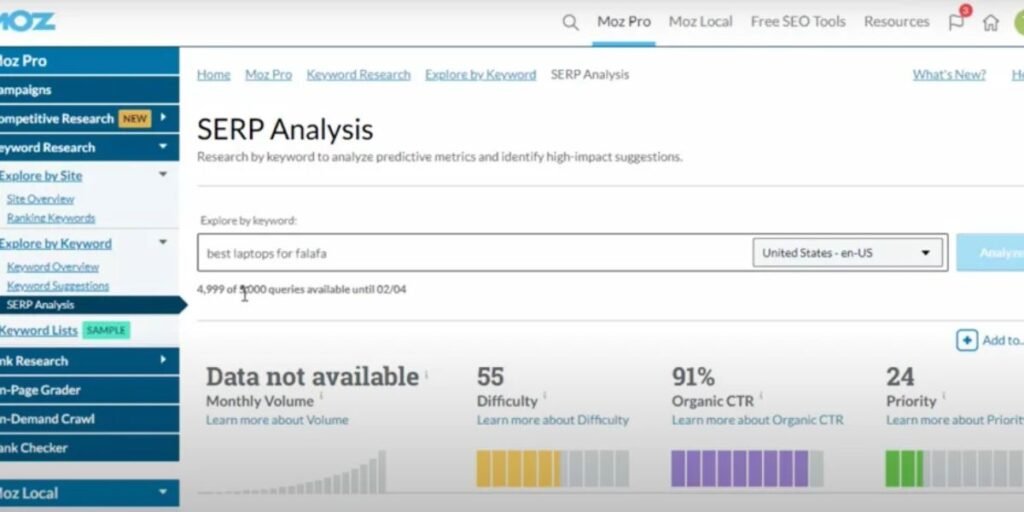
Once the query processes, Moz displays the Keyword Overview dashboard. This interface consolidates the core metrics needed to perform initial screening:
- Monthly Volume: Displays the estimated range of monthly searches based on anonymized clickstream data and historical search trends.
- Difficulty: Displays the 1–100 score estimating the competitive strength of the current top ten organic results.
- Organic CTR: An estimated percentage indicating the proportion of searchers likely to click a traditional organic listing, accounting for ads, local packs, and AI features.
- Priority: An aggregated metric combining high volume, lower difficulty, and strong organic CTR into a single efficiency score.
- Search Intent: Categorizes the dominant user intent behind the query, such as Informational, Transactional, Navigational, or Commercial Investigation.
3. Find Related Keywords Worth Investigating
Below the main metric tiles, select Keyword Suggestions from the left-hand navigation menu. This section expands your initial query into related semantic variants, long-tail phrases, and question-based searches.
Filter the suggestions using the dropdown options:
- Display keywords containing the exact seed word to find close variations.
- Filter by question formats to isolate informational queries ideal for top-of-funnel content.
- Group by low, medium, or high similarity to discover broader topical clusters.
4. Check the Freshness of the Data
Moz updates its SERP cache and difficulty metrics periodically based on query popularity and search volatility. Look at the Last Updated timestamp located near the SERP Analysis section at the bottom of the page.
If the data was cached several months ago or if the current live search page has shifted due to a core algorithm update, click the Refresh SERP button where available. Updating the cache ensures that the calculated difficulty score and competitor link metrics reflect the live Google results page.
How to Interpret Moz Keyword Difficulty Scores
Understanding how to read the numerical difficulty score prevents you from abandoning valuable target keywords or wasting editorial resources on unreachable rankings.
What Low, Moderate, and High Difficulty Really Mean
The Keyword Difficulty score reflects the collective competitive strength of the pages currently ranking on page one of Google:
- 1–30 (Low Difficulty): The current top-ranking pages possess modest link profiles and lower Page Authority. These search results often contain thin content, user-generated forum threads, or unoptimized pages, making them accessible to newer domains with modest link equity.
- 31–60 (Moderate Difficulty): A competitive middle ground. Page one contains established websites, solid content assets, and well-structured internal links. Ranking here requires well-researched content, clear search intent matching, and targeted backlink acquisition.
- 61–100 (High to Extremely High Difficulty): Highly competitive search landscapes dominated by high-authority domains, enterprise portals, brand queries, or government institutions. Reaching the top five organic positions demands extensive domain authority, substantial link equity, and comprehensive topical coverage.
Avoid using arbitrary numerical thresholds as universal rules across your entire website. A difficulty score of 45 might be unreachable for a brand-new blog, whereas an established domain with a Domain Authority of 65 can target that same query with high confidence.
Why a Low Difficulty Score Does Not Guarantee Rankings
A low difficulty score simply indicates that competing URLs carry lower link metrics according to Moz’s index. It does not guarantee an easy path to page one.
Google evaluates real-time signals, topical relevance, entity relationships, and user engagement. A page with a Page Authority of 15 can hold position one over a higher-authority competitor if its content satisfies search intent directly, provides superior visual evidence, or delivers direct expertise that competitors lack.
How Your Website’s Authority Changes the Decision
Evaluating keyword difficulty requires comparing the ranking pages against your own site’s current standing.
Use Domain Authority (DA) as a comparative benchmarking metric rather than an absolute rule. If the current top five URLs carry Domain Authority scores between 25 and 35, and your site operates at a DA of 30, the query represents a realistic target. If the top results are held by enterprise publishers with DA scores above 80, competing on link authority alone will prove difficult, regardless of how low the page-level link counts appear.
How to Use Difficulty Alongside Search Volume
Evaluating difficulty in isolation leads to poor content planning. A keyword with a lower search volume (200–500 monthly searches) and a low difficulty score often yields far more commercial value than a broad head term (20,000 monthly searches) with an extreme difficulty rating.
Prioritize terms where search volume aligns with clear commercial or informational intent, ensuring that the ranking effort yields qualified organic traffic.
How to Use Moz SERP Analysis to Evaluate Ranking Competition
The SERP Analysis module inside Moz Keyword Explorer offers a granular breakdown of the actual search engine results page, moving beyond top-level metric averages.
Examine the Pages Already Ranking on Google
Scroll down to the SERP Analysis section within Keyword Explorer to view the specific URLs currently holding top positions. Click through to open the live ranking pages directly in your browser.
Analyze the dominant content formats Google rewards for the query:
- In-depth informational guides vs. summary overviews.
- E-commerce category pages or interactive software tools.
- Listicles and roundups vs. single-product reviews.
Matching the dominant content format is critical. If all top five results are interactive calculator tools, publishing a 3,000-word static blog post will rarely secure top rankings, regardless of your domain authority.
Compare Page Authority and Domain Authority
Review the Page Authority (PA) and Domain Authority (DA) columns for each ranking result. Look for structural patterns across page one:
- High DA, Low PA: Established enterprise sites ranking primarily on domain strength despite having few direct backlinks to the specific URL.
- Low DA, High PA: Smaller or niche websites holding top positions because the specific page has earned targeted, high-quality backlinks.
- Low DA, Low PA: Outliers in the SERP. Finding two or more pages in the top ten with low PA and DA indicates a clear content gap or an accessible keyword opportunity.
Look for Weaknesses in Competing Content
Evaluating competitors’ content quality reveals where your page can add distinct value. Inspect the live ranking pages against these evaluation criteria:
- Does the competing page answer the user’s query immediately, or does it bury the core solution beneath thin background text?
- Is the published information current, or does it reference outdated industry data, obsolete product versions, or broken links?
- Does the content demonstrate first-hand experience, including original screenshots, unique data sets, or direct testing results?
- Are key follow-up questions left unanswered, forcing searchers to return to the search results page?
Identifying these gaps allows you to publish content that offers greater depth, superior accuracy, and better structural clarity than existing options.
Check SERP Features and Available Organic Clicks
Modern search results include rich elements that alter standard click distribution. Moz highlights the presence of these features directly within the SERP analysis interface:
- AI Overviews: AI-generated summaries displayed at the top of the search results, which can satisfy basic informational queries without requiring a click.
- Featured Snippets: Direct answer boxes that occupy position zero, drawing significant click volume from standard organic positions.
- People Also Ask (PAA) Boxes: Expandable question accordions that reveal related search intents.
- Local Packs and Video Carousels: Visual modules that divert attention away from traditional text listings.
Review the Organic CTR score alongside the feature breakdown. If a keyword carries a search volume of 5,000, but SERP features drop the Organic CTR score to 40%, the realistic traffic potential for standard organic listings is significantly lower than the raw volume implies.
How to Find Keywords Worth Targeting With Moz
Start With Relevance, Not Just Difficulty
Never select target terms based solely on low difficulty metrics. A keyword must align directly with your site’s core topic, your audience’s needs, and your commercial objectives. Attracting traffic from irrelevant, low-difficulty queries inflates pageviews without driving business outcomes or building meaningful topical authority.
Filter Keyword Suggestions by Intent and Competition
Use the filtering controls inside Moz Keyword Explorer to narrow large lists into actionable publishing candidates:
- Enter a broad seed term related to your primary service or product category.
- Apply a Difficulty filter (e.g., maximum score of 40) to remove highly competitive enterprise terms.
- Filter by Search Intent to separate informational research queries from commercial investigation terms.
- Export the filtered list to a CSV spreadsheet for comparative analysis.
Find Specific Queries That Competitors Overlook
Select the Display phrases containing questions filter inside Keyword Suggestions to isolate long-tail queries. Question-based terms often carry lower difficulty scores and reflect specific user needs, making them excellent candidates for targeted guides, FAQ sections, or supporting blog posts.
Prioritize Opportunities Your Website Can Realistically Compete For
Compare candidate terms against your team’s publishing capacity, backlink acquisition resources, and current domain strength.
Prioritize queries where:
- The Difficulty score falls within or near your domain’s DA range.
- The Organic CTR score remains above 60%, ensuring solid click availability.
- Existing top-ranking pages exhibit clear content weaknesses or outdated information.
- Your team can provide authentic expertise, original data, or first-hand experience that competitors lack.
A Practical Example: Evaluating a Keyword From Start to Finish
To illustrate how these steps work in practice, let us walk through evaluating a hypothetical B2B search query: best project management software for small businesses.
(Note: The metrics below are illustrative examples designed to demonstrate the evaluation workflow).
1. Check Volume and Difficulty
Entering the phrase into Moz Keyword Explorer reveals:
- Monthly Volume: 2,800 – 4,300 monthly searches.
- Difficulty: 58 / 100 (Moderate to High).
- Organic CTR: 62% (Moderately reduced due to sponsored ad units at the top of the SERP).
2. Review Search Intent
Moz classifies the search intent as Commercial Investigation. Searchers are comparing multiple software tools before making a purchasing decision, looking for feature breakdowns, pricing comparisons, and pros and cons lists.
3. Analyze the SERP Landscape
Opening the SERP Analysis tab reveals how real-world productivity tools perform in side-by-side workflows on page one:
4. Evaluate Content Quality and Identify Gaps
Inspecting the live ranking pages shows that positions one and two are held by massive media sites with high Domain Authority. However, position three and position four are held by smaller niche sites with modest DA scores (31–42) and fewer direct backlinks.
Examining the actual content reveals key weaknesses in the top results:
- The top two articles list 25 different tools without providing real workflow testing details or pricing breakdowns for small teams.
- The information on pricing tiers across three listed tools is outdated by over a year.
- None of the top articles include real dashboard screenshots or step-by-step setup walkthroughs.
5. Final Targeting Decision
Decision: Target with a narrowed, highly specialized content asset.
If your site operates at a DA of 35, attempting to outrank enterprise publishers for the broad query might require extensive backlink outreach. However, because smaller sites (DA 31–42) hold positions three and four, a well-structured, thoroughly tested comparison post can realistically secure a top-five ranking.
To increase your competitive edge, you can narrow the focus slightly to a more specific variant, such as best project management software for small agency teams, capturing high-intent traffic with lower competition.
Common Mistakes When Using Moz Keyword Difficulty and SERP Analysis
Evaluating target terms using digital research tools requires balancing software indicators against real-world search conditions. Relying blindly on automated scores can lead to wasted content budgets, unrealistic ranking expectations, or missed organic opportunities.
Choosing Keywords Solely Because Their Difficulty Scores Are Low
Targeting terms simply because the Moz Keyword Difficulty score falls below 30 represents a common strategic error. A low score indicates weak backlink metrics among current ranking URLs, but it does not evaluate whether the search phrase serves your commercial goals or matches your audience’s intent.
To build an effective publishing roadmap, filter candidate queries by topical relevance and user intent first. You should evaluate the difficulty score only after establishing that the search phrase attracts qualified prospects or supports your core content pillars.
Assuming Domain Authority Directly Determines Google Rankings
Treating Domain Authority (DA) as an official Google ranking factor leads to misjudged competitive analysis. DA is a proprietary predictive metric created by Moz to estimate link strength relative to other sites in its index. Google does not use Domain Authority or Page Authority when scoring pages in its actual algorithms.
Instead of treating DA as an absolute gatekeeper, use it as a comparative benchmarking guide to assess competitor backlink profiles. You will get far better results by combining this metric with direct evaluations of content depth, site structure, user experience signals, and topical relevance.
Ignoring the Search Intent of Current Results
Attempting to force an e-commerce product page onto a search results page dominated by informational buying guides usually fails, regardless of how strong your domain’s link metrics may be. Google prioritizes content formats that satisfy the primary intent of searchers.
Before outlining any content, open the top five ranking URLs directly in your browser. Identify whether the page one layout favors long-form informational articles, transactional product pages, interactive calculators, or comparison roundups, and mirror that format in your publishing strategy.
Treating Estimated Search Volume as Guaranteed Traffic
The Monthly Volume metric in Moz Keyword Explorer provides a modeled estimate based on historical trends and anonymized clickstream data. It represents total search activity across all users, not the actual visitors your specific website will receive upon ranking.
Always factor Organic CTR into your traffic projections. You must also account for position distribution, where position one typically captures 25%–30% of organic clicks, while positions lower on page one receive significantly smaller shares of total search traffic.
Overlooking SERP Features That Reduce Organic Click Opportunities
Selecting keywords based purely on high monthly volume without checking the search results layout can artificially inflate traffic projections. The presence of AI Overviews, Featured Snippets, Top Stories, Local Packs, and paid shopping ads diverts user attention away from traditional text listings.
Review the SERP Features breakdown inside Moz before committing to a target keyword. Focus your efforts on terms where the Organic CTR score remains strong, or structure your content specifically to target and win the featured snippet position.
Comparing Difficulty Scores Across Different SEO Platforms
Assuming a difficulty score of 40 in Moz represents the same competitive pressure as a 40 in Ahrefs or Semrush leads to flawed comparative analysis. Each platform calculates keyword difficulty using proprietary formulas, different backlink indexes, and distinct weighting models.
To maintain strategy consistency, conduct your comparative research within a single platform. If you rely on Moz for a campaign, evaluate all candidate keywords against Moz’s scale rather than mixing metrics from multiple SEO software providers.
Evaluating Competitors by Authority Metrics Without Inspecting Content
Relying entirely on Page Authority and Domain Authority scores ignores critical content quality gaps. High-authority domains often rank for secondary search terms with outdated information, poor layout structure, or incomplete answers.
Take the time to perform manual content audits on the top three competing pages. Look for missing information, broken internal resources, outdated data points, or unhelpful layouts that give your team an opportunity to publish a demonstrably superior resource.
Targeting Keywords That Do Not Fit Your Site’s Audience
Securing position one for a high-volume, low-difficulty keyword provides little value if the searchers have no interest in your products, services, or core topics. Irrelevant organic traffic increases bounce rates without generating leads, subscribers, or commercial conversions.
Make sure every keyword target aligns directly with a defined stage in your audience’s buyer journey. Prioritizing terms that attract prospective customers will always yield better long-term returns than pursuing vanity traffic metrics.
Is Moz Keyword Explorer Enough for SERP Analysis?
Moz Keyword Explorer provides an efficient framework for aggregating search volume, estimating relative competition, and inspecting SERP feature layouts. Its clear metric design and integrated Organic CTR calculations make it an effective tool for initial keyword filtering and shortlist creation.
However, software metrics alone cannot replace human editorial judgment. While Moz quantifies link equity and domain strength, it cannot measure whether a competing page delivers genuine first-hand experience, clear visual instructions, or comprehensive subject mastery.
When comparing SEO platforms, Ahrefs and Semrush offer larger link indexes and faster database update frequencies, making them popular choices for large-scale enterprise tracking. Moz Pro maintains a distinct advantage in accessibility and clarity, providing an intuitive interface ideal for small-to-midsize marketing teams, in-house strategists, and independent site owners.
The optimal workflow uses Moz Keyword Explorer to perform data-driven screening and competitor identification, followed by manual SERP verification to evaluate content quality, search intent alignment, and realistic ranking potential.
Conclusion
Successfully navigating keyword research in modern search engine optimization requires balancing numerical estimates with hands-on evaluation. The Moz Keyword Difficulty Checker serves as an effective diagnostic tool for filtering out unreachable targets and identifying viable search opportunities. However, the difficulty score represents only the starting point of a complete research process.
Evaluating the actual search engine results page through Moz SERP Analysis reveals critical context that raw scores miss. Inspecting competing page formats, verifying search intent, assessing content gaps, and checking for SERP features like AI Overviews or Featured Snippets ensures that your editorial team invests resources in queries with genuine organic click potential.
Combine relevance, intent alignment, search volume, Organic CTR, and manual competitor evaluations to build an authoritative content plan. Focus on publishing thorough, accurate, and highly useful resources that serve searcher needs better than existing alternatives, turning keyword research metrics into sustainable organic growth.
Effective keyword research is only one part of a successful SEO strategy. Evaluating website health, analyzing competing pages, and monitoring backlink profiles also help identify opportunities to improve organic search performance. If you want to explore these areas further, the following articles cover useful SEO tools and techniques:
- 10 Best Keyword Difficulty and SERP Analysis Tools
- Technical SEO Audit Checklist for Finding and Fixing Site Errors
- Free Backlink Checkers You Can Use Without Signing Up
Frequently Asked Questions
How Accurate Is Moz Keyword Difficulty?
The Moz Keyword Difficulty score offers an accurate prediction of relative backlink strength and link equity among top-ranking URLs. Because it relies on Moz’s link index, it serves as an effective benchmark for comparing ranking friction across keywords. However, it does not measure real-time Google user experience signals, content freshness, or topical relevance, meaning it should be used alongside manual SERP checks rather than as a guaranteed prediction.
What Is a Good Keyword Difficulty Score in Moz?
A good difficulty score depends on your website’s current authority, publishing resources, and backlink profile. For a newer domain with modest link equity, target scores in the 1–35 range. Established websites with higher Domain Authority can comfortably target terms with difficulty scores in the 36–60 range.
Does Moz Keyword Explorer Show Google’s Current Search Results?
Moz caches and updates SERP data periodically based on query volume and search volatility. While the SERP Analysis tab reflects recent Google rankings, live search results change frequently due to algorithm updates and localized layouts. Always click the Refresh SERP button inside Moz or perform a manual search in an incognito browser window to verify live results before finalizing major content decisions.
Can You Use Moz Keyword Explorer for Free?
Yes. Moz provides access to Keyword Explorer through a free account tier that allows a limited number of search queries per month. For unlimited research, expanded data exports, and advanced campaign tracking, users can subscribe to Moz Pro plans starting at $49 per month for the Starter tier, or sign up for a 7-day free trial on the Medium tier.
What Is the Difference Between Keyword Difficulty and SERP Analysis?
Keyword Difficulty condenses top-ranking competitor link metrics into a single numerical score (1–100) to estimate competitive pressure. SERP Analysis displays the full breakdown of page-level data, including specific URLs, Page Authority, Domain Authority, root link counts, and active SERP Features, allowing you to inspect individual competitors directly.
How Often Should You Recheck Keyword Difficulty?
Recheck keyword difficulty scores before starting new content production cycles or when refreshing existing pages that have lost ranking position. Updating difficulty and SERP data every 3 to 6 months ensures that your strategy reflects recent competitor content updates, new backlink acquisitions, and algorithm changes across your target search queries.