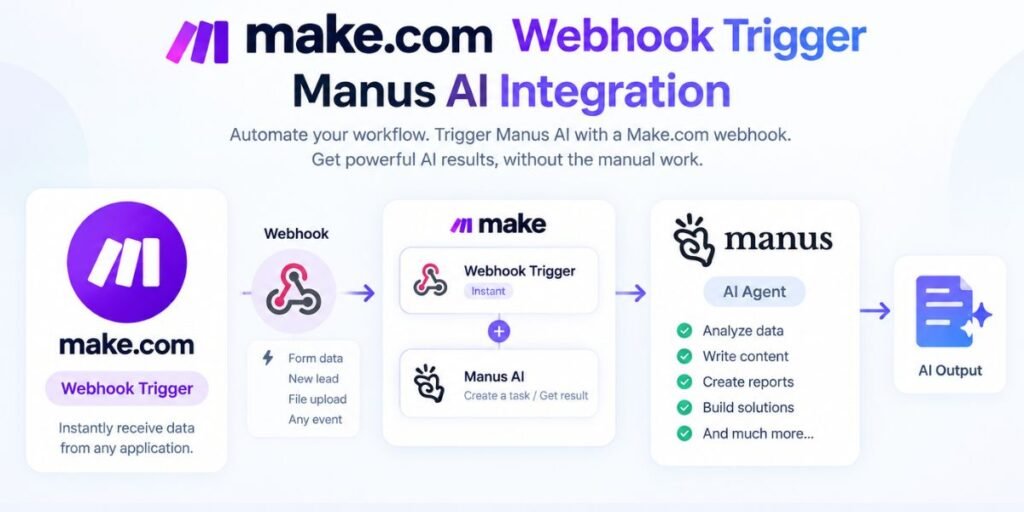
Connecting an automation platform to an advanced artificial intelligence environment usually comes down to solving a single operational puzzle. You have applications and services generating events in real time, but those systems cannot natively talk to an AI agent built to execute complex, multi-step execution paths.
When you want to bring Make.com and Manus AI together, the missing bridge is the event handoff. An external event needs to hit a Make scenario, Make needs to translate that raw incoming data into a structured instruction set, and an API request must fire off to create a task in Manus. Down the line, the workflow also needs to listen for updates when Manus finishes its work or hits a roadblock that requires human intervention.
That entire round-trip relies entirely on webhooks and API calls.
This guide breaks down the exact mechanics required to build a production-ready integration between both platforms. It covers what each tool actually does in the architecture, how to structure your payloads, how to authenticate and secure your endpoints against unauthorized traffic, how to handle state changes using Manus API v2, and how to test every single failure point before launching the workflow into live production.
What Make.com and Manus AI Each Do in This Workflow
Understanding the distinct responsibilities of each platform prevents architectural confusion down the road.
Make.com
Make operates as a visual integration platform built around scenarios and modules. A scenario acts as an automated pipeline where an incoming event triggers a series of processing steps, transforming data and routing it to external endpoints.
Within this environment, Make Webhooks serve as the primary entry point. A Custom Webhook module provisions a unique HTTPS URL that listens for incoming HTTP requests from external systems. The moment an external service sends a payload to that URL, Make triggers the scenario to run, ingesting the raw data and making every field available for mapping in subsequent modules.
Manus AI
Manus functions as the autonomous AI-agent layer designed to execute complex computational and digital tasks. Rather than relying solely on consumer chat interfaces, engineering workflows require programmatic access.
The Manus API allows external applications to create, manage, and monitor tasks programmatically. Alongside outbound API calls, Manus features native webhook dispatching that reports task lifecycle events directly back to a specified endpoint. This creates a fully event-driven loop where tasks can be initiated, tracked, and updated without manual oversight.
Why Use Both?
Pairing these platforms together leverages the core strengths of each system. Make handles event orchestration, data formatting, and downstream application syncing across CRMs, databases, and communication channels. Manus handles heavy AI execution. Connecting them via webhooks and APIs removes the manual bottleneck of copying requests between browser tabs.
How Make.com Webhooks and Manus Work Together
Before building out modules, visualizing the exact data path prevents structural mistakes.
The data movement follows a specific sequence:
- An external event fires from a form, app, or schedule.
- The request hits the Make custom webhook URL.
- The Make scenario executes and processes the incoming payload.
- Make sends an HTTP request to the Manus API endpoint.
- Manus initializes and runs the AI task.
- Manus triggers an outbound webhook event upon state changes.
- Make receives the Manus callback and executes subsequent automation steps.
A common misconception is that the Make webhook itself creates the Manus task. It does not. The Make webhook merely captures the incoming trigger data. Your scenario must take that data, format it into a structured request body, and explicitly dispatch an HTTP call to the Manus API.
What a Typical Make-to-Manus Workflow Looks Like
Consider a real-world scenario where a client submits a detailed research request through a website form.
The form data hits your Make custom webhook. Make parses the submission, extracts the customer name, specific requirements, and company website, and structures them into a clean prompt template. Make then fires an API request to Manus containing those instructions.
Manus receives the task, initializes its agent environment, and begins executing the multi-step research assignment. Hours or minutes later, once the task reaches a milestone or concludes, Manus fires an HTTP POST notification back to a second Make webhook endpoint. Make captures the task status, extracts the final output, and automatically updates the original CRM record or sends a Slack notification to your team.
Setting Up the Make.com Webhook
Building the entry point begins inside Make by adding a Webhooks module and selecting the Custom Webhook option. Once you save the module, Make generates a unique HTTPS URL. This endpoint acts as the listener for your integration.
When configuring the source system to ping this URL, the incoming payload should deliver clean, highly structured data rather than an unfiltered data dump.
A reliable JSON payload structure typically includes:
- request_id: a unique identifier from your source database for tracking
- customer_name: the name of the client or internal requester
- task_title: a concise summary of what needs to be accomplished
- prompt_instructions: the core instructions or parameters for the AI agent
- source_url: any reference link required for context
When you send a sample request to the webhook URL while Make is actively listening in the editor, Make automatically learns the data structure. This allows every individual field to become available for mapping in downstream scenario modules. Furthermore, Make supports API-key protection for custom webhooks, ensuring that random public traffic cannot trigger your scenarios without an authorized header.
Connecting the Make Scenario to Manus
Once the webhook captures and parses the incoming data, the scenario must reach out to the AI environment. This requires an HTTP request module configured to communicate directly with the Manus API.
The integration relies on specific technical parameters:
- Base URL: [https://api.manus.ai](https://api.manus.ai)
- API Endpoint: The specific route for task creation
- HTTP Method: POST
- Request Headers: Authorization tokens and content-type declarations
- JSON Request Body: The structured prompt and execution parameters mapped from your webhook data
Rather than dumping raw text into the API call, successful automation depends on transforming raw data into structured instructions. For example, if Make receives unstructured form fields, the scenario should assemble them into a clear execution prompt that tells Manus exactly what steps to take, what output format to use, and which reference URLs to visit.
Retaining your original internal request_id alongside the newly generated Manus task ID inside a shared data store or database is critical. That linkage ensures that when Manus eventually reports back, your system knows precisely which client or project triggered the run.
Getting Manus Task Updates Back Into Make
An integration that only pushes data outward is incomplete. To build a true two-way loop, you must configure Manus webhooks to report task lifecycle events back to Make.
By setting up a second Custom Webhook module inside Make as your receiving endpoint, you give Manus a valid destination for its HTTP POST notifications. The operational flow shifts from a single direction to a complete loop: Make calls the Manus API to start work, and later, Manus calls the Make webhook to report progress.
The current Manus API documentation utilizes structured event notifications, primarily tracking events such as task_created and state changes like task_stopped.
Understanding the exact meaning of these events prevents automation errors:
- task_created: Fires when Manus successfully accepts the incoming task request, allowing you to log the task ID, record the timestamp, and update internal tracking sheets.
- task_stopped: Requires careful handling because it does not automatically mean the task finished successfully. Manus designates this state to cover both successfully completed tasks and tasks that have paused because they require human input to proceed.
Your Make scenario receiving this callback must inspect the payload details and use conditional routing rather than assuming every stopped task equals a finished product.
Using the Manus Result in the Rest of Your Automation
Once Make receives the event notification from Manus, the scenario can direct the output wherever it needs to go.
Common downstream actions include:
- Updating the original CRM record with the AI-generated research summary or status flag
- Saving completed deliverables directly to cloud storage databases or document management systems
- Dispatching automated email notifications or Slack alerts to project managers
- Routing tasks that triggered a user-input flag into a human review queue
- Triggering subsequent Make scenarios to execute secondary operational workflows
Treating Manus as a powerful processing node within a wider architecture rather than the final dead-end of your system unlocks the true power of event-driven automation.
Securing the Make and Manus Webhooks
Exposing webhooks to the public internet introduces security risks if endpoints remain unprotected. Securing both ends of the pipeline prevents unauthorized triggers and malicious data injection.
For the inbound entry point on Make, configure API-key authentication to ensure your custom webhook rejects any incoming HTTP request that fails to present a valid secret token in the header.
For the outbound callback coming from Manus, implement webhook signature verification. Manus signs its webhook payloads using RSA-SHA256 and supplies a public key for verifying that incoming payloads genuinely originated from their servers. Additionally, checking request timestamps guards your system against replay attacks, ensuring an intercepted packet cannot be fraudulently re-sent to trigger repeated automation runs.
Testing the Full Workflow
Relying on a single test run inside an editor window is not enough to guarantee production reliability. A thorough testing phase validates the entire round-trip from initial trigger to downstream action.
Your test checklist should cover:
- Sending a valid request to confirm successful task creation and callback handling
- Submitting payloads with missing required fields to test error management
- Providing invalid API credentials to verify authentication failure handling
- Simulating a task requiring human input to test conditional routing paths
- Testing downstream action failures to ensure error-catching modules trigger properly
- Sending duplicate event payloads to check your idempotency safeguards
Troubleshooting Make.com and Manus Webhook Problems
When unexpected behavior occurs, systematic debugging keeps production downtime to a minimum.
Common failure points and fixes include:
- Make Webhook Receives Nothing: Verify the URL string, check that the external app sends a proper POST request, and ensure the Make scenario is actively listening in the editor.
- Make Receives Data but Manus Rejects the Task: Inspect your API authentication headers, review the JSON payload schema against the latest API documentation, and check for rate-limiting errors.
- Manus Creates the Task but Make Gets No Callback: Confirm that your registered callback URL is publicly accessible via HTTPS and that your endpoint responds within the mandatory 10-second window with a 2xx status code.
- Duplicate Event Processing: Ensure your scenario checks incoming event IDs and task IDs against an internal database to prevent duplicate downstream actions.
API Version Matters
Technical implementations must always align with current infrastructure standards. The Manus documentation explicitly marks API v1 as deprecated, requiring developers to build and maintain workflows using API v2. Designing your HTTP modules around the latest version ensures long-term stability and prevents sudden breaking changes when legacy endpoints are retired.
What to Know Before Using This in Production
Before pushing your integrated workflow into live daily operations, review critical performance and operational thresholds:
- Maintain strict credential hygiene by storing API keys in secure environment variables rather than hardcoding them into data fields.
- Enforce strict input validation on all incoming webhook payloads before passing them to the AI agent.
- Account for volume limits, as Make enforces an incoming webhook limit of up to 300 requests per 10-second interval, returning a 429 status code for traffic exceeding that threshold.
- Implement robust error-handling routes to catch failed downstream service calls and notify administrators immediately.
Conclusion
Combining Make.com and Manus AI bridges the gap between traditional event orchestration and autonomous agent execution. Make handles the routing, data parsing, and application syncing, while Manus powers the heavy computational work. By implementing secure webhooks, proper signature verification, and API v2 endpoints, you create a robust, two-way automation pipeline that runs reliably at scale.
Read More: Make.com and Meta API Integration: Building a No-Code Marketing Automation Bridge