
Modern revenue operations often suffer from a fundamental disconnect. Customer relationship management tools record valuable lead qualification milestones, e-commerce platforms process offline transactions, and Meta platforms host the advertising campaigns that generated those initial interactions.
Bridging these isolated data silos becomes essential when a business needs offline customer actions to feed back into ad optimization engines. At the same time, pulling advertising metrics into internal reporting software provides a complete picture of campaign profitability.
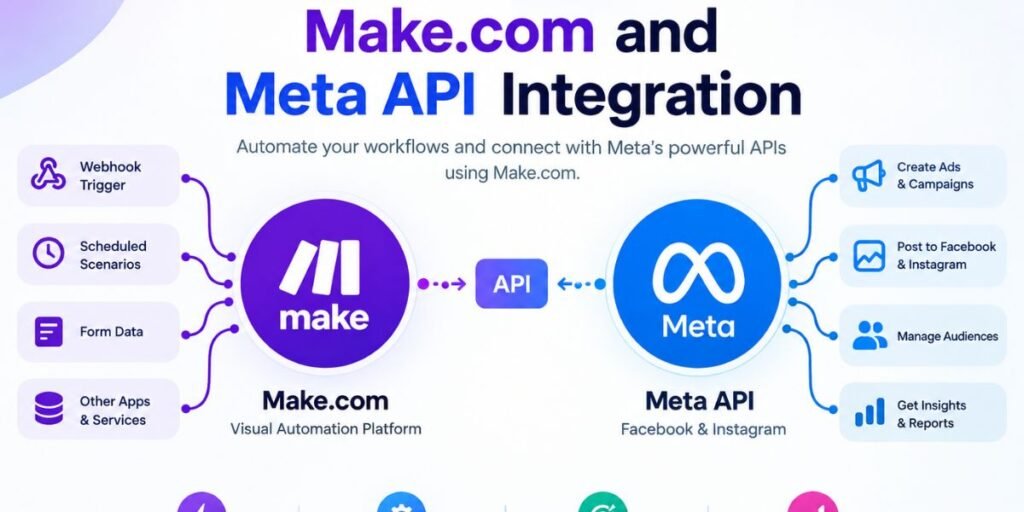
Make.com acts as the visual automation layer connecting these disparate environments. Building this bridge requires understanding that data moves in multiple directions.
Native Meta modules handle standard advertising operations and conversion tracking out of the box, while the flexible HTTP module provides a direct pathway for custom API endpoints when specialized parameters are required.
This guide breaks down the practical architecture, data mapping strategies, authentication requirements, and error-handling workflows necessary to maintain a reliable marketing pipeline.
What You Can Actually Connect Between Make.com and Meta
Planning a successful integration requires mapping out the exact data exchanges your marketing operations demand. Rather than relying on generic feature lists, every connection serves a specific operational goal across your advertising and sales stack.
Send Conversion and Customer Events to Meta
When customer actions happen inside a CRM, website, or backend billing system, those offline events must travel back to Meta.
Using the Facebook Conversions API via Make.com ensures that lead qualification milestones, subscription renewals, or completed purchases register correctly as conversion data, bypassing browser-side tracking limitations.
Work With Campaign and Advertising Data
Managing advertising assets programmatically requires direct interaction with Meta advertising objects.
Workflows can be structured to create new ad sets, update active campaign budgets, adjust targeting parameters, or pause underperforming creatives based on automated performance triggers coming from external tools.
Bring Advertising Insights Into Another System
Reporting workflows frequently require pulling performance data out of Meta.
Metrics covering cost per acquisition, click-through rates, and impression volume flow through Make.com integrations directly into central data warehouses, custom spreadsheets, or executive notification channels.
Call Meta API Endpoints Directly
Standard platform modules cover most standard use cases, but unique campaign requirements sometimes demand specialized parameters.
The generic HTTP app allows builders to dispatch direct API requests to any valid Graph API endpoint when native module parameters fall short.
The Make.com–Meta Architecture
Visualizing data movement prevents structural design flaws before scenario building begins. Data flows along two distinct pathways depending on the operational goal.
Customer conversion data flows outward from internal systems:
- CRM, website, or ecommerce store feeds into Make.com, which processes the payload before dispatching it to the Meta API.
Performance reporting flows inward from advertising accounts:
- Meta ad accounts output performance metrics into Make.com, which transforms the data before writing it to a database or reporting dashboard.
Operating between these endpoints, Make.com executes a precise sequence. It receives a webhook trigger, retrieves related records, filters unqualified data, transforms field structures, maps variables, sends the payload, and processes the resulting response.
Make does not replace the underlying Meta API infrastructure. It acts as an orchestration engine that moves, transforms, and validates information between independent platforms.
Choosing the Right Make Route for Meta
Selecting the correct integration route early prevents structural bottlenecks during scenario development.
- Send supported conversion events: Route data through the dedicated Facebook Conversions API module to ensure proper event deduplication and parameter handling.
- Work with supported advertising objects: Utilize native Meta advertising modules for campaign, ad set, and creative management.
- Retrieve supported advertising insights: Implement Facebook Insights modules to fetch performance metrics across designated date ranges.
- Perform an operation not exposed natively: Deploy the HTTP module to interact with unexposed Graph API endpoints.
- Build a multi-system marketing workflow: Combine native Meta modules with external CRM, database, or notification apps in a single automated scenario.
The golden rule of platform design dictates starting with native modules whenever possible. Fall back to direct HTTP requests only when native actions lack the required control or parameter exposure.
A Real Example: Sending Qualified Leads From a CRM to Meta
Consider a scenario where a business generates leads through Meta ad campaigns, but the true value of those leads remains locked inside an internal CRM system. A prospective customer submits an ad form, enters the CRM, and goes through a multi-step sales vetting process.
The initial lead submission holds minimal conversion value compared to the moment the sales team qualifies the lead or closes a high-value contract. Automating this feedback loop requires a structured event path.
- A new lead enters the CRM from a Meta ad campaign.
- The sales team reviews and updates the contact status to qualified.
- Make.com detects the CRM record update through a webhook trigger.
- A built-in filter checks whether the record meets specific qualification criteria.
- The scenario fetches any supplementary customer metadata required by the API.
- Make maps the CRM fields into the required Meta payload structure.
- The scenario pushes the event through the Conversions API module.
- Make captures the API response and logs the transaction status.
- The CRM record updates with a processed flag to prevent duplicate submissions.
Designing the Event Before Building the Scenario
Building a functional automation requires mapping out the customer lifecycle before touching a single configuration screen. A standard business pipeline progresses through distinct stages:
- Lead
- Contacted
- Qualified
- Opportunity
- Customer
- Purchase
Not every pipeline status change warrants a ping to the Meta ad platform. Transmitting every minor profile update creates bloated event logs and distorts algorithmic optimization.
Define meaningful business events by isolating moments of high commercial intent. Tie conversion events strictly to actions that prove economic value, such as moving from a raw lead to a financially vetted opportunity.
Aligning your automation rules with the natural movement of your sales pipeline prevents wasted API calls and keeps ad optimization algorithms focused on high-quality conversions.
Mapping the Source Data to Meta
Establishing a connected API does not guarantee proper data transmission. The receiving endpoint expects specific parameter structures, and failing to format fields correctly leads to rejected payloads.
A conversion payload typically requires a precise set of variables:
- Event name
- Event timestamp
- Customer identifier parameters
- Event source URL
- Transaction value and currency
- External event identification strings
Data transformation inside Make bridges the gap between your source format and Meta’s requirements.
If your CRM labels a stage as Lifecycle = Qualified, a Make filter halts execution for any other status. Once the filter passes the record, transformation tools normalize phone numbers, hash email addresses using required cryptographic standards, and map the clean variables into the outgoing Meta module.
Accurate mapping ensures that ad algorithms can successfully match offline conversions back to the original ad impression.
Authentication, Access, and Meta Permissions
Securing an integration pipeline requires understanding how credentials interact across different layers of the infrastructure. Authentication proves your identity to the platform, access controls which business assets you can touch, and permissions dictate whether your token is allowed to execute specific API requests.
Native Make.com connections handle authentication through OAuth flows, streamlining access to standard Meta Business Manager assets. However, direct HTTP requests bypass these managed wrappers, requiring manual configuration of authorization headers, app secrets, and system user access tokens.
When an API call fails despite valid data formatting, diagnosing the issue usually points back to token permission scopes or Business Manager asset verification. Keeping access tokens secure and avoiding hardcoded secrets inside shared scenario variables protects your ad accounts from unauthorized exposure.
Building the Make Scenario
Constructing a reliable automation scenario follows a logical sequence from trigger activation to final error handling. Skipping structural checkpoints often results in silent failures or unhandled data corruptions.
- Trigger: Select the source application that detects when a meaningful business event occurs.
- Filter: Implement strict evaluation rules to allow only records meeting precise criteria.
- Data Retrieval: Fetch supplementary customer details if the initial trigger payload lacks required fields.
- Transformation: Normalize text strings, format timestamps, and hash sensitive user identifiers.
- Transmission: Dispatch the payload through a native Meta module or custom HTTP request.
- Response Capture: Store the confirmation code or error payload returned by the API.
- Follow-Up: Update the source record, log transaction results, or route errors to an administrator.
When the HTTP Module Is the Better Bridge
While native modules handle most common tasks, advanced use cases occasionally demand direct interaction with Meta Graph API endpoints. Understanding the structure of a raw API request is essential before swapping a native module for the HTTP app.
A direct request requires defining the target endpoint URL, selecting the HTTP method, supplying authorization headers, structuring query parameters, and formatting the JSON request body.
Deploy the HTTP module when you need to interact with recently released API features, execute batch requests, or manage custom parameters that native Make developers have not yet exposed.
The primary trade-off is maintenance overhead. HTTP modules provide total flexibility, but they also require you to manage payload syntax and monitor API version deprecations manually.
Handling Meta API Responses
A complete automation scenario accounts for both outgoing data and incoming system responses. Ignoring what the API returns leaves your workflow blind to silent transmission failures.
- Successful Response: Log the confirmation identifier and update the source record to indicate successful processing.
- Invalid Request: Isolate records that trigger client-side errors so administrators can correct data formatting without crashing the scenario.
- Temporary Failure: Implement automatic retry logic for server-side timeout errors or rate-limiting responses.
- Authentication Failure: Route permission errors directly to an alert channel rather than looping bad authorization requests.
Preventing Duplicate Conversion Events
Processing the same business event multiple times distorts ad optimization algorithms and inflates conversion metrics. Duplicates often stem from repeated webhook deliveries, scenario retries following partial failures, or multiple CRM updates on a single contact record.
Preventing duplicate transmissions requires establishing strict safeguards within the workflow architecture. Assigning a unique event identifier to every transaction allows Meta to deduplicate incoming signals.
Additionally, writing a processed flag back to the source CRM immediately after a successful API call ensures that subsequent record updates do not trigger secondary transmissions. Combining unique event IDs with state-tracking flags creates a reliable defense against redundant data flow.
Testing the Integration With Controlled Data
Enabling a live marketing automation workflow without rigorous testing risks polluting ad optimization data with malformed payloads. A methodical testing sequence protects production data integrity.
- Select a single known test record inside your staging environment.
- Confirm that Make.com captures the exact source payload from your trigger app.
- Inspect transformed field values to verify proper data normalization and hashing.
- Dispatch the test event and review the immediate API response from Meta.
- Verify the event registration inside Meta Events Manager testing tools.
- Run intentional failure tests using invalid records and unauthenticated tokens.
- Test duplicate event handling and verify that retry paths function correctly.
Sending Meta Insights Back Into the Marketing Stack
Marketing optimization is a two-way street. Pulling performance metrics out of ad accounts provides valuable operational data for executive reporting and internal attribution models.
- Campaign Performance: Retrieve daily spend, impression volume, and click-through rates across active ad sets.
- Data Warehousing: Route historical ad metrics into central databases or reporting spreadsheets for cross-channel analysis.
- Operational Notifications: Trigger internal team alerts when campaign spend exceeds specific thresholds or cost per acquisition spikes.
- Attribution Modeling: Combine advertising expenditure data with internal sales revenue figures to calculate true return on ad spend.
Make.com supports retrieving insights at the account, campaign, ad set, and ad levels, making performance data extraction a seamless addition to your operational stack.
Building a Closed-Loop Marketing Workflow
Mature marketing operations rely on closed-loop data flows that connect advertising exposure to ultimate revenue generation.
The outbound pipeline pushes verified customer conversion events from internal systems back into Meta, feeding optimization algorithms with high-value signals. Simultaneously, the inbound pipeline pulls ad performance metrics into internal reporting dashboards.
Keeping these data flows distinct prevents architectural confusion. Outbound paths focus on conversion tracking and audience quality, while inbound paths drive analytics and financial reporting.
Keeping the Integration Reliable After Launch
A live automation pipeline requires ongoing maintenance to handle platform updates, token expirations, and unexpected data inputs.
Monitor execution history regularly to catch silent failures, unhandled exceptions, and rate-limit warnings before they disrupt data flow. Keep track of Meta API version deprecation schedules to ensure native modules and custom HTTP endpoints do not break during routine platform updates.
Documenting your field mapping rules and event triggers ensures that internal teams can audit or modify the workflow as business requirements evolve.
A Production-Ready Make.com and Meta Workflow
- Business Event: A critical customer milestone occurs in your operational stack.
- Source System: The CRM or ecommerce platform captures the raw event data.
- Make Trigger: A webhook or polling module captures the initial record.
- Filter: Unqualified records are dropped to prevent wasted API calls.
- Validation and Mapping: Data fields are normalized, hashed, and mapped to API requirements.
- Execution Engine: Native Meta modules or custom HTTP requests dispatch the payload.
- API Destination: Meta processes the incoming conversion event or data request.
- Response Handling: Successful transactions update internal flags, while errors route to recovery queues.
Where the No-Code Approach Ends
Visual automation platforms eliminate the need to write custom applications from scratch, but they do not erase the underlying technical realities of API architecture.
Building a robust marketing bridge still requires a solid grasp of authentication tokens, JSON payload structures, data hashing protocols, and error management strategies.
The primary advantage of using Make.com lies in replacing boilerplate code with visual logic, allowing revenue operations teams to build, test, and scale complex data pipelines without maintaining dedicated software engineering infrastructure.
Read More: How to Use Make.com Webhooks to Trigger Manus AI Tasks
Conclusion
Building a successful integration between Make.com and Meta comes down to deliberate architectural choices. Define your target marketing operations first, and choose native modules when standard features match your needs. Reserve direct HTTP requests for custom endpoints that demand granular control.
The long-term reliability of your automation depends less on the initial connection setup and more on rigorous event design, accurate data mapping, robust error handling, and careful management of the customer lifecycle.