What is SaaS (Software as a Service)?
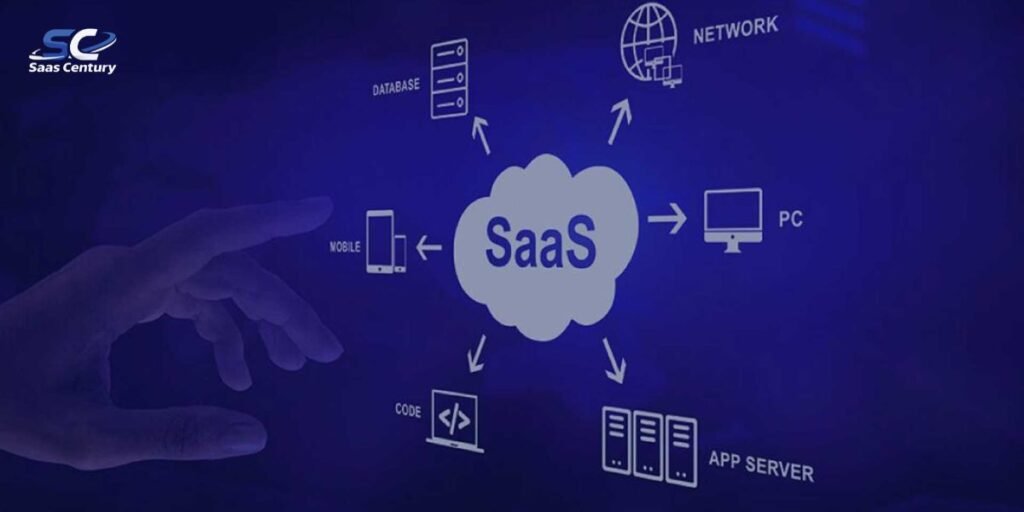
SaaS stands for Software as a Service. This model represents a method of software delivery where applications are hosted on remote servers and accessed by users over the internet. Instead of purchasing a physical disc or downloading a large installer file to a specific hard drive, individuals and organizations subscribe to the functionality they need.
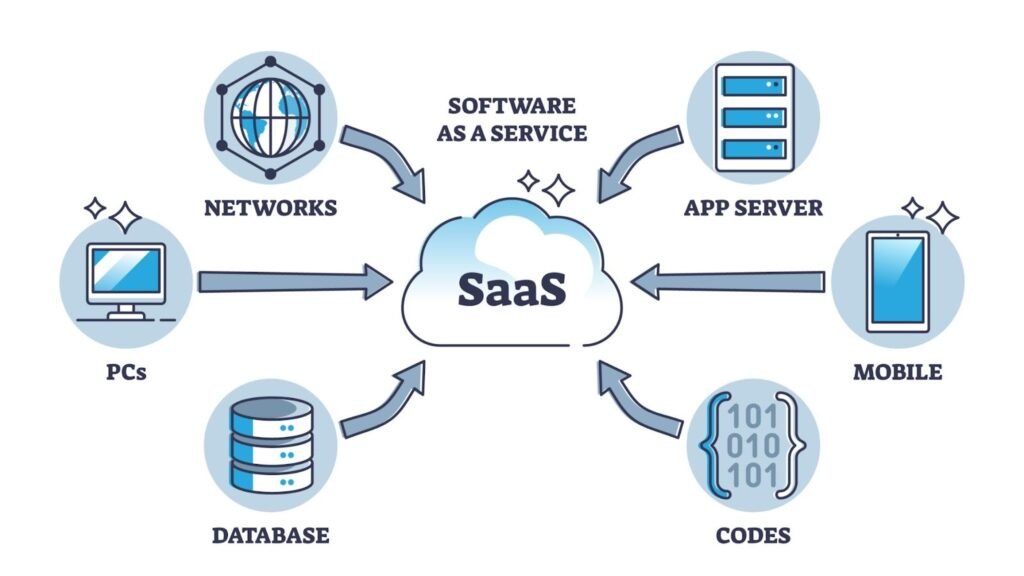
This shift from a product based economy to a service based model has redefined how modern business is conducted. It removes the traditional barriers of high entry costs and complex manual installations. SaaS applications are also commonly referred to as web based software or on demand software.
Historically, software was a commodity that users bought once and installed on a single machine. Traditionally, IT departments had to manually update every computer in an office to ensure compatibility. If a hard drive failed, the software and the data stored within it were often lost. SaaS transforms this commodity into a service that is rendered through the cloud.
The relevance of this model extends to every tier of the global economy. Small startups use these tools to access enterprise grade capabilities that were once only available to massive corporations. Large scale organizations rely on the cloud to maintain agility and ensure that their global workforce stays connected through a unified platform.
Because the software is delivered via the cloud, the burden of managing servers and database security shifts from the internal IT department to the specialized vendor. This allows businesses of all sizes to focus on their core objectives rather than technical maintenance. Everyday examples that many people use without a second thought include Gmail for communication and Netflix for entertainment.
How SaaS Works
The functional core of the Software as a Service model is the centralized hosting of application code. When a user interacts with a platform like Google Workspace or Microsoft 365, they are communicating with servers owned and managed by the service provider. The application logic and user data stay in a remote data center.
Users simply log in through a web browser or a dedicated mobile application to interact with the interface. This provides the flexibility to work from any location with an internet connection. The cloud acts as a giant pool of processing power and storage that is available on demand.
Multi-tenant architecture is the technical standard for most modern applications. This structure allows a single instance of the software to serve multiple customers simultaneously. While the underlying code and hardware are shared, each customer remains isolated in a secure and private data partition.
This approach creates massive economies of scale. It allows the provider to push a single update that instantly improves the experience for every subscriber on the platform. The cost of maintaining the infrastructure is distributed across thousands of users, making advanced software much more affordable.
Vendor responsibilities form a major part of the value proposition. The provider handles all aspects of infrastructure management including server health and power and physical security. Beyond hardware, the vendor is responsible for deploying security patches and feature updates.
This ensures that the software remains resilient against emerging cyber threats without requiring any action from the end user. From a technical perspective, the vendor manages the operating systems and the middleware, leaving the user to handle only the configuration of the application itself.
A practical example is found in the workflow of a Customer Relationship Management tool like Salesforce. When a sales representative adds a new lead from a mobile phone, that data is instantly transmitted to the cloud. A manager in a different city can immediately view that same information on a desktop browser.
The synchronization happens in real time because the central server acts as the single source of truth for all users. This creates a single customer view across departments such as sales, marketing, and support.
Multi-Tenant vs Single-Tenant SaaS
Multi-tenant environments are the most common because they offer the lowest price points and the fastest update cycles. In this setup, resources like computing power and storage are distributed across many users. This is highly efficient for general business tools where standard configurations are acceptable.
Most small and medium businesses prefer this model due to its simplicity and cost effectiveness. It functions much like an apartment building where residents share the same foundation and roof but have their own private living spaces.
Single-tenant architecture provides a dedicated instance of the software for a single customer. This is often chosen by large enterprises or industries with strict regulatory requirements. It offers a higher degree of customization and total control over the update schedule.
Organizations in healthcare or finance might select this path to ensure their data is physically separated from other users on the server. This model is more like a standalone house where the owner has complete control over the entire property.
Advantages of SaaS
Scalability remains one of the most powerful reasons for the widespread adoption of this model. A growing company can add hundreds of new seats to its subscription in minutes. Conversely, a business facing a seasonal slowdown can reduce its user count to save money.
This flexibility prevents the waste of resources and ensures that the software budget always aligns with the actual needs of the workforce. SaaS solutions can scale up or down without requiring the business to purchase additional physical servers.
Subscription based pricing models have replaced the high upfront costs associated with traditional software licenses. This allows companies to preserve their cash flow and treat software as an operational expense rather than a major capital investment.
Most providers offer tiered plans that cater to different stages of growth. A small business might start with a basic free tier and upgrade to a pro version as they expand their operations.
- Financial Predictability Monthly or annual fees allow for precise budget planning.
- Zero Infrastructure Investment There is no need to buy expensive servers or maintain cooling systems.
- Lower Initial Risk Most tools offer trials or monthly contracts that allow users to test the product before committing to a long term deal.
Automatic updates ensure that every user is working on the most current version of the tool. In the past, IT teams had to manually install updates on every individual computer which often led to version conflicts.
With the cloud model, the vendor handles the transition seamlessly. This means that bug fixes and new features are available immediately upon release. Users never have to worry about running an outdated or insecure version of the software.
Cloud accessibility supports the modern mobile workforce by providing a consistent experience across all devices. Whether an employee is using a laptop at home or a tablet at a job site, the data remains identical.
Integration with other systems is also simplified through the use of Application Programming Interfaces or APIs. These allow different tools to share data and automate tasks such as syncing customer information between a marketing tool and an accounting platform.
Built in redundancy is a major safety benefit that often goes overlooked. In an on-premise setup, a hardware failure or a local disaster could result in total data loss. With cloud based SaaS, the data is automatically backed up in multiple geographic locations. This ensures that even if one server goes offline, the service remains available and the data stays safe.
Common SaaS Applications
Customer Relationship Management systems represent one of the most successful categories in the industry. Platforms like HubSpot and Zoho allow teams to track every interaction with a client in a shared environment. This eliminates the need for messy spreadsheets and ensures that sales and support teams stay aligned.
Enterprise Resource Planning tools help large organizations manage complex back end operations. These platforms integrate diverse functions such as supply chain management and manufacturing and inventory control into one interface. By centralizing this data, leaders can gain a clear view of the entire business and identify areas for improvement.
- Email Marketing Software Tools like Mailchimp enable businesses to automate outreach and track engagement metrics.
- Collaboration Tools Slack and Microsoft Teams have become the digital headquarters for remote and hybrid teams.
- Productivity Suites Google Workspace allows for real time collaboration on documents and creative designs.
- HR and Accounting Specialized software like Workday or QuickBooks simplifies payroll and tax compliance through automation.
SaaS Applications by Industry
| Industry | Primary SaaS Use Case | Top Tools |
| Healthcare | Patient records and telemedicine | Epic and Doxy.me |
| Finance | Secure transactions and auditing | Stripe and Xero |
| Education | Learning management and virtual classrooms | Canvas and Google Classroom |
| Retail | E-commerce and point of sale | Shopify and Square |
This diversity shows that the Software as a Service model is not limited to general office work. It has successfully moved into specialized sectors providing tailored solutions for the unique challenges of every industry. Professionals now have access to high performance tools that are specifically designed for their daily workflows.
The expansion into niche markets is often called Vertical SaaS. Unlike broad tools that try to serve everyone, Vertical SaaS focuses on the specific regulatory and operational needs of a single sector. This specialization provides users with features that are much more relevant to their specific jobs.
SaaS vs Other Cloud Models
Cloud computing is generally categorized into three distinct service layers. These layers are defined by the amount of responsibility shared between the vendor and the customer. Understanding where Software as a Service fits within this stack is essential for determining which model aligns with specific technical or business goals.
Infrastructure as a Service or IaaS is the foundation of the cloud. It provides the raw building blocks such as virtual servers and storage and networking. Users who choose IaaS are responsible for managing the operating systems and middleware and the applications themselves. This model offers the highest level of control but requires significant technical expertise to maintain.
Platform as a Service or PaaS serves as a middle ground. It provides a pre configured environment where developers can build and deploy custom applications without worrying about the underlying hardware. The vendor manages the servers and the operating system while the user manages the application code and data. This is ideal for internal development teams focused on creating proprietary software.
Software as a Service sits at the top of the stack as a complete solution. In this model the vendor manages everything from the physical servers to the final user interface. It is a turnkey product that requires no development or infrastructure management from the customer.
Cloud Service Comparison
| Feature | IaaS | PaaS | SaaS |
| Ease of Use | Complex setup required | Moderate technical skill | Instant access via login |
| Control | Full administrative control | Control over app code | Limited to settings |
| Maintenance | High user responsibility | Vendor manages OS | Vendor manages everything |
| Primary User | IT Architects | Developers | Business End-Users |
When to Choose SaaS vs PaaS or IaaS
The decision to adopt a specific model depends on the balance between control and convenience. Organizations should choose SaaS when they need a reliable and standardized tool that works immediately. For example a business looking for an email platform like Microsoft Outlook or a design tool like Canva should always opt for SaaS to avoid the cost of building these systems from scratch.
PaaS is the better choice when a company needs to build a unique application that provides a competitive advantage. If a retail business wants to create a custom loyalty app with specific features not found in off the shelf products they would use PaaS. This allows them to focus on the code while the cloud provider handles the scaling of the database.
IaaS is reserved for scenarios requiring total environmental control. This is common for large enterprises migrating legacy data centers to the cloud or for research institutions running massive simulations that require specific hardware configurations. It is the most flexible model but carries the heaviest operational burden.
Challenges and Risks of SaaS
Despite the numerous benefits there are inherent risks that businesses must evaluate before committing to a platform. Vendor lock-in is a primary concern for long term planning. Since the software and data live on the provider’s infrastructure moving to a competitor can be technically difficult and expensive. If a vendor uses a proprietary data format exporting that information into a new system may require complex conversion processes.
Data security and compliance remain critical talking points. While major providers like Amazon Web Services or Google Cloud invest billions in security the customer ultimately relinquishes direct control over their information.
For industries governed by strict privacy laws such as the GDPR in Europe or HIPAA in the United States a breach at the SaaS provider could lead to legal consequences for the customer. It is vital to ensure the vendor meets all necessary certifications before uploading sensitive records.
- Internet Dependence Because the application is hosted remotely a loss of connectivity results in a complete loss of access to the tool.
- Performance Issues High latency or slow internet speeds can make feature-rich applications feel sluggish compared to software installed locally.
- Customization Limitations Users are typically restricted to the features and interface provided by the vendor which may not perfectly align with specialized internal workflows.
Forced adoption of updates can also present a challenge. Unlike on-premise software where a company can choose to stay on an older version for stability SaaS providers push updates to all users simultaneously. This can sometimes lead to broken integrations or the sudden removal of a feature that a team relied upon for their daily tasks. It also requires constant training as the interface changes over time.
Best Practices for SaaS Adoption
A secure transition to the cloud requires a proactive strategy. Centralized access control through Identity and Access Management or IAM is the first line of defense. By integrating SaaS applications with a central directory like Microsoft Entra ID or Okta businesses can enforce strong password policies and multi-factor authentication.
This ensures that when an employee leaves the company their access to every cloud tool can be revoked instantly from a single dashboard. It also provides a clear audit trail of who accessed which data and when.
Shadow SaaS monitoring is a necessary step for modern IT departments. This refers to the practice of employees signing up for unauthorized software to complete their work. While often done with good intentions these unmanaged accounts can lead to data leaks and wasted budget.
Organizations should use specialized discovery tools to scan their networks for unknown cloud traffic. Once identified these tools can either be officially vetted and brought into the corporate fold or replaced with approved alternatives.
- Security Assessments Conduct a thorough review of the vendor’s SOC 2 reports and encryption methods during the procurement phase.
- Continuous Monitoring Use security platforms to watch for suspicious login activity or large scale data downloads that might indicate a compromised account.
- Incident Response Develop a specific plan for what to do if a major SaaS provider goes offline or suffers a breach including how to communicate with clients and where to find data backups.
Safe adoption also involves regular training for staff members. Most security incidents are the result of human error such as falling for a phishing email designed to steal cloud credentials. By educating the workforce on how to identify these threats and emphasizing the importance of using official company channels businesses can significantly reduce their risk profile while enjoying the full advantages of the SaaS model.
Emerging Trends in SaaS
The Software as a Service landscape is shifting from providing simple digital tools to delivering intelligent and autonomous ecosystems. As we move through 2026, several key trends are redefining how software is built and consumed. Artificial Intelligence is the primary driver of this change, moving beyond basic automation into generative and predictive capabilities.
AI-powered SaaS tools now function as proactive partners rather than passive interfaces. For example, modern CRM platforms like Salesforce or HubSpot use machine learning to predict which leads are most likely to close. Meanwhile, content platforms utilize generative AI to draft initial reports or marketing copy based on minimal user input. This shift allows employees to focus on high-level strategy while the software handles the iterative and data-heavy tasks.
Low-code and no-code platforms are democratizing software development. These tools allow non-technical business users to build custom workflows and internal applications using visual drag-and-drop interfaces. By reducing the reliance on specialized coding knowledge, departments can solve their own specific problems faster. This trend effectively bridges the gap between the IT department and the rest of the business, accelerating digital transformation across the board.
Product-Led Growth or PLG has become the dominant go-to-market strategy for modern vendors. In this model, the product itself is the primary driver of customer acquisition and expansion. Tools like Zoom or Slack gained massive market share by offering high-value free versions that users could adopt instantly without a traditional sales call. When the product proves its value, the user naturally upgrades to a paid tier. This creates a frictionless entry point and relies on a superior user experience to drive revenue.
Industry-specific SaaS solutions, often called Vertical SaaS, are replacing general-purpose software in highly regulated sectors. These platforms are designed with the unique compliance and operational needs of a single industry in mind.
- Healthcare Platforms like Athenahealth focus on patient privacy and electronic health records.
- Finance Tools like Plaid or Stripe provide the specialized infrastructure needed for secure global payments.
- SMB-focused Applications like Square or Mindbody cater specifically to the needs of local retail and fitness businesses.
How SaaSCentury Supports SaaS Businesses
SaaSCentury serves as a centralized intelligence hub for the modern software professional. In an era where the sheer volume of available cloud tools can lead to decision paralysis, our platform provides the clarity needed to build an efficient and cost-effective tech stack. We bridge the gap between complex technical documentation and practical business application by offering a curated space for discovery and education.
Our primary focus is on empowering businesses through deep-dive reviews and authoritative guides on essential software categories. Whether someone is searching for the best SEO tools to drive organic growth, or a robust CRM to manage the customer lifecycle, SaaSCentury offers the contextual information required to make an informed choice. We analyze the latest trends in marketing automation and data security to ensure our readers stay ahead of the curve.
The practical value of SaaSCentury lies in our commitment to reliability and educational depth. We help SaaS founders and business owners navigate the shift toward AI-integration and usage-based pricing models. By following our resources, organizations can avoid the common pitfalls of SaaS sprawl and vendor lock-in, ultimately choosing software that acts as a genuine catalyst for long-term success.
Closing Lines
The evolution of Software as a Service has fundamentally changed the relationship between businesses and technology. By offloading the burden of hardware maintenance and software updates to specialized vendors, organizations can now operate with unprecedented speed and flexibility.From the small entrepreneur using a basic accounting tool to the global enterprise managing thousands of remote workers, the cloud model has made high-performance software accessible to everyone.
As trends like Agentic AI and Vertical SaaS continue to mature, the focus will move even further away from managing tools and toward achieving business outcomes. Staying informed through resources like SaaSCentury ensures that you can navigate these changes effectively.
By understanding the mechanics and the risks and the emerging opportunities within the SaaS landscape, you can build a digital foundation that is both resilient and ready for the future.
Frequently Asked Questions (FAQs)
What is SaaS?
SaaS stands for Software as a Service. It is a cloud-based delivery model where a provider hosts applications and makes them available to users over the internet. Instead of installing software locally, you access it via a web browser or mobile app, usually through a monthly or annual subscription.
How is SaaS different from PaaS and IaaS?
The difference lies in how much of the technology stack you manage. IaaS provides the raw infrastructure like servers. PaaS provides a platform for developers to build their own apps. SaaS is a finished product managed entirely by the vendor.
What are the main benefits of SaaS?
The primary advantages include lower upfront costs and instant accessibility from any location. Users also benefit from automatic security updates and the ability to scale their subscription up or down based on current business needs.
How secure is SaaS?
Most major SaaS providers invest more in cybersecurity than the average individual business can afford. They utilize advanced encryption and zero-trust architectures. However, security is a shared responsibility, and users must ensure they use strong authentication and vet their vendors thoroughly.
Can SaaS applications be customized?
Yes, but only within the parameters set by the provider. While you cannot change the underlying source code, most platforms allow you to customize dashboards and workflows and user permissions. You can also use APIs to integrate the software with your existing business systems.