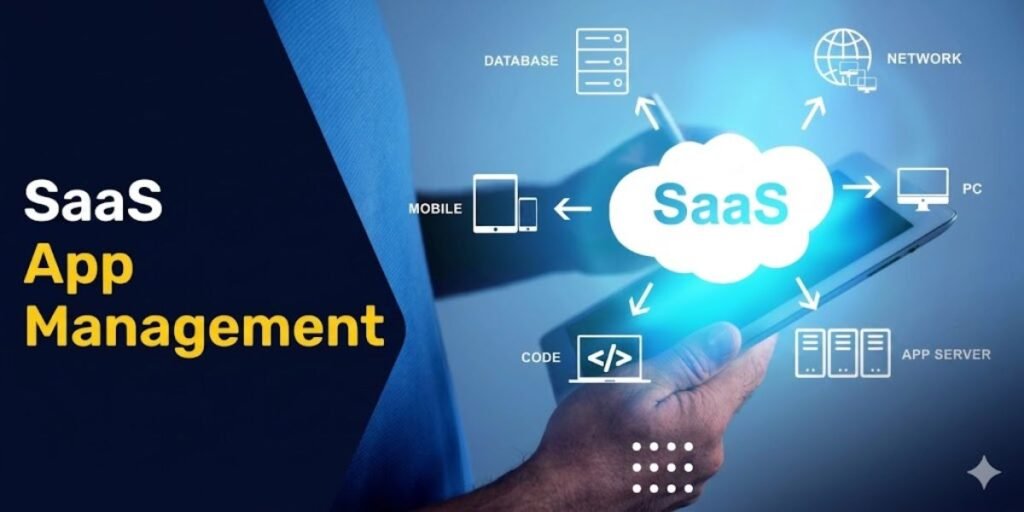
Modern enterprise architecture operates across a highly decentralized layout of cloud environments. Organizations no longer rely on a single localized software database to run their daily workflows. Instead, modern production relies on interconnected networks of software as a service applications that handle data transmission, human resources, finance tracking, and client relationships simultaneously.
A typical enterprise deployment operates hundreds of active cloud tools in parallel, ranging from core communication suites like Microsoft 365 and Slack to advanced market frameworks like Salesforce. This shift alters the core requirements of corporate software administration. IT departments cannot simply install an application on a local drive and mark the project complete.
Because cloud subscriptions update continuously, businesses face constant operational adjustments. Software assets must be tracked, secured, monitored, and audited in real time to prevent corporate data leaks and stop financial waste. This systematic oversight is known as SaaS app management.
Failing to build a dedicated operational layer over cloud applications creates immediate vulnerabilities. When individual departments purchase separate software tools without central authorization, corporate data security boundaries break down and unmonitored spending increases.
Building a structured lifecycle framework for cloud tools helps digital directors protect corporate data layers, cut out duplicated subscriptions, and ensure every software purchase delivers clear operational value.
What is SaaS App Management?
SaaS app management is the structured administrative practice used to discover, secure, govern, and optimize the complete lifecycle of cloud based applications across an organization. It establishes a central control layer that monitors how software is purchased, who holds active login permissions, and how corporate data moves between different cloud vendor environments.
At a practical level, this discipline focuses on answering specific corporate governance questions:
- Which specific cloud applications hold active data connections to our core business network?
- Which individual employees or automated service accounts have login access to these platforms?
- Do these applications comply with current global data protection standards and encryption rules?
- Are we wasting corporate budget on underutilized seat licenses or duplicate software tools?
- Does a specific application provide enough measurable utility to justify an annual contract renewal?
Unlike legacy asset management, which dealt with static physical software discs and fixed server keys, cloud application environments change daily. Because an individual employee can bypass corporate purchasing loops and activate a cloud subscription instantly using a corporate credit card, maintaining centralized visibility is a constant operational challenge.
Why SaaS App Management Has Become Essential
A major shift in purchasing power has changed the relationship between central IT departments and business software users. Historically, corporate technology teams held absolute control over software installation pipelines, manually testing and deploying applications onto individual machines. Today, the widespread availability of web based cloud software lets any department head or individual worker configure a powerful cloud application in minutes.
This decentralized accessibility produces complex operational realities that challenge traditional corporate security and financial frameworks.
The Problem of SaaS Sprawl
Different teams inside the same enterprise frequently purchase entirely separate software platforms to solve the identical operational problem. For example, the marketing team might adopt one project management tracker while the design team signs a contract for a different tool. This uncoordinated purchasing results in massive functional duplication, splinters team communication, and breaks down cross-department workflows.
The Rise of Shadow IT
Shadow IT describes the unauthorized use of cloud applications, data storage tools, or communication utilities without the explicit approval or visibility of the central IT and security groups. Employees often connect their corporate email profiles to unverified external apps for quick convenience. This practice creates massive unmonitored entry points that completely bypass corporate data loss prevention systems and identity access controls.
Structural Cost Leakage
Because cloud software charges operate on recurring subscription models, unmonitored accounts cause quiet, ongoing budget loss. Organizations regularly pay for automatic premium tier renewals long after an employee has left the firm or a project has been shut down. These ghost licenses run continuously in the background, draining thousands of dollars from operational budgets without generating any corporate return.
The SaaS Application Lifecycle (Core Framework)
To manage cloud environments successfully, enterprise technology teams cannot treat software purchases as isolated events. Every cloud tool must move through a structured, multi-phase governance framework that monitors performance from initial discovery through final decommissioning.
1. Discovery: Finding Every SaaS Tool in Use
Achieving total visibility across the network infrastructure is the foundation of any successful governance program. Organizations cannot secure or optimize an application asset if they do not know it exists inside their ecosystem.
Building an accurate, real-time software inventory requires tracking multiple distinct operational tiers:
- Officially sanctioned corporate tools backed by enterprise agreements and central IT funding.
- Dedicated department-level subscriptions funded through local operational budgets without central enrollment.
- Under-the-radar shadow IT applications used by individual employees to manage company files.
- Free web utilities that process corporate data without formal security reviews.
To uncover these hidden software footprints, modern enterprises use automated discovery mechanisms rather than relying on manual employee surveys. Security tools monitor enterprise single sign-on logs, scan corporate expense reports for recurring vendor charges, and analyze browser activity signals across company-managed devices to build a complete software directory.
2. Evaluation and Approval Before Adoption
Before a business permits a new cloud application to link into its primary data directory, the platform must pass a rigorous security and compliance audit. This review ensures the vendor’s data handling methods match the legal obligations of the organization.
The pre-adoption review process evaluates several critical operational vectors:
- The vendor’s overall security architecture, penetration testing histories, and vulnerability management programs.
- Exact data handling policies, specifying where information is physically stored and how data is isolated in multi-tenant environments.
- Verifiable alignment with global compliance frameworks like GDPR, HIPAA, SOC 2, and ISO standards.
- The application’s technical compatibility with existing single sign-on frameworks and centralized identity networks.
- The total cost of ownership over a multi-year period, including configuration costs, training time, and integration maintenance.
For enterprise operations utilizing advanced identity management platforms like Okta, this evaluation phase is hardcoded into automated procurement workflows. Access keys remain completely locked until the platform receives digital approval tokens from the corporate compliance, legal, and security teams.
3. Onboarding and Configuration
Once an application passes initial validation, engineering teams must configure the platform to align with corporate security rules. Improper onboarding configuration remains one of the primary causes of cloud data exposures across major global industries.
Proper platform initialization relies on setting up several core security layers:
Automated User Provisioning
Instead of manually typing user credentials into individual software tools, administrators use identity protocols like SCIM to automate profile management. This system ensures that when an employee change occurs, access permissions update instantly across every connected cloud app.
Granular Role-Based Access Control
Administrators enforce the principle of least privilege, mapping out precise user groups so that employees only see the exact data directories needed to complete their specific jobs. General users are blocked from accessing master configuration settings, billing profiles, or global data export tools.
Centralized Single Sign-On Mapping
The application is integrated directly into the corporate identity portal, forcing all user authentication loops to run through a single protected entry point. This configuration lets security teams apply unified password rules and enforce multi-factor authentication across every tool in the company directory.
4. Active Usage Monitoring
Deploying an approved application is not the end of the management process. Organizations must continuously audit user interaction patterns to ensure corporate software investments match actual operational usage.
Technology managers track specific behavioral metrics to measure the health of a software deployment:
- The ratio of active monthly users compared to total paid seat licenses.
- Specific feature adoption patterns to see if teams are utilizing advanced premium modules or only using baseline features.
- The frequency of data sharing events and external file transfers.
- Department-level adoption rates to identify where additional software training is needed.
This analysis often reveals significant software inefficiencies. An enterprise might find itself paying for a premium 500-user tier when only 300 employees are actually logging into the platform on a monthly basis. This clear visibility gives procurement teams the hard data they need to downscale contract commitments during upcoming vendor discussions.
5. Security and Governance Control
Because cloud software lives outside the traditional physical network perimeter, perimeter-based firewalls cannot protect corporate data. Security in modern SaaS environments relies entirely on identity verification, data access tracking, and configuration auditing.
Maintaining a resilient cloud security posture requires enforcing specific governance rules:
- Role-Based Access Control: Restricting administrative permissions to verified system engineers and running scheduled audits to revoke elevated clearance levels from standard users.
- Continuous Data Encryption: Verifying that all data remains fully encrypted both while moving across the open internet and while sitting inside the cloud provider’s databases.
- Centralized Audit Log Aggregation: Routing the event logs from every separate cloud tool into a central security monitoring system to catch unauthorized file downloads or suspicious login locations.
- Third-Party Integration Monitoring: Tracking and restricting the sub-apps and browser extensions that employees link to their core business accounts, blocking unverified add-ons from reading corporate files.
While major cloud networks like Salesforce and Microsoft 365 provide native security dashboards, enterprise security teams must still build an independent oversight layer to monitor risks across their entire software ecosystem.
6. Cost Optimization and License Management
Unchecked cloud software spending can quickly compromise corporate financial efficiency. Managing these software expenses requires aligning procurement loops with established cloud financial management practices, commonly known as FinOps.
Cost optimization programs focus on eliminating explicit budget leaks through targeted actions:
- Automatically identifying and deactivating software licenses assigned to employees who have left the firm or changed departments.
- Downgrading users from high-cost premium tiers to standard access levels if their usage logs show they do not use advanced features.
- Consolidating overlapping tool sets by moving different teams onto a single enterprise software standard.
- Combining scattered department subscriptions into a single corporate contract to leverage volume discounts.
Treating license management as an ongoing financial review rather than an annual accounting chore allows organizations to keep their software spending directly aligned with actual company headcount and true operational needs.
7. Renewal, Consolidation, or Retirement
Every corporate cloud software contract eventually hits a structured evaluation milestone. To prevent software bloat from degrading company focus and inflating budgets over time, management teams treat every contract expiration as a strict review point.
When a software contract approaches its renewal window, procurement teams select one of three operational paths:
- Renew: Re-up the subscription if the platform continues to deliver high usage metrics, clear security compliance, and measurable business value.
- Consolidate: Merge distinct software tools if multiple departments are using overlapping applications, moving everyone onto a single standard platform to cut costs.
- Retire: Completely remove the application from the corporate network if usage logs have dropped significantly or if a superior, more secure alternative has been integrated into the business.
This continuous lifecycle review stops unnecessary software platforms from piling up over time, keeping the corporate technology environment clean, secure, and highly efficient.
Core Challenges in SaaS App Management
Even highly sophisticated enterprise technology teams face significant friction when trying to establish control over their cloud environments. The decentralized nature of modern web software creates natural obstacles to centralized oversight.
Organizations frequently navigate several systemic management challenges:
- Fragmented Software Adoption: Individual departments continue to buy niche tools independently, making it difficult for central IT teams to enforce standardized data management practices across the firm.
- The Visibility Deficit: Because new cloud apps launch daily, IT teams often operate with a blind spot, missing an estimated 30% to 40% of the actual software applications running across their user network.
- Expanding Attack Surfaces: Every separate cloud platform that an employee connects to their business profile creates another potential entry point for attackers to exploit.
- Disconnected Data Silos: When teams use standalone apps that do not pass data to each other, critical business information becomes trapped in isolated systems, slowing down company workflows.
- Uncontrolled Subscription Inflation: Small, low-cost monthly software subscriptions bypass standard corporate purchasing controls, quiet accumulation into major annual financial liabilities.
SaaS Management Platforms (How Companies Regain Control)
To manage this growing complexity without adding massive manual administrative workloads, organizations deploy specialized software architectures known as SaaS Management Platforms (SMPs).
These systems connect directly into an enterprise’s core identity providers, financial ledgers, and endpoint management tools to provide a unified control dashboard:
- They automatically build and maintain a complete inventory of every cloud tool connected to the business.
- They track active user logons across different apps to highlight underutilized licenses and pinpoint budget waste.
- They continuous audit platform settings to catch misconfigured file-sharing rules or unencrypted data buckets.
- They track contract expiration dates and vendor commitments across every department to streamline upcoming renewals.
- They trigger automated workflows to instantly clear user access permissions when an employee leaves the company.
By serving as an overarching orchestration layer, these platforms give IT directors and security teams the centralized visibility needed to manage a highly decentralized software footprint successfully.
SaaS Security in the Real World
Modern cloud security challenges look fundamentally different than the infrastructure threats of the past. When an enterprise suffers a cloud data exposure, the root cause is rarely a direct flaw in the cloud vendor’s physical server hardware. Instead, data breaches usually stem from user identity failures and internal platform misconfigurations.
Common real-world vulnerabilities inside cloud environments include:
- Over-permissioned user accounts that grant standard employees master administrative control over global data directories.
- Weak authentication setups that let users log into critical business systems without multi-factor verification.
- Unmonitored third-party app connections that allow basic browser extensions to read and copy confidential corporate files.
- Incorrectly configured document sharing links that expose sensitive internal company folders to the public web.
To counter these systemic access risks, modern cloud architects implement Zero Trust security models. Under a Zero Trust approach, the network completely discards the concept of a trusted internal perimeter. Every individual user, laptop, and application request must be explicitly verified, checked for proper permissions, and cryptographically authenticated before gaining access to corporate data assets.
The Role of Automation in SaaS Management
Managing a modern enterprise cloud environment through manual spreadsheets and manual user audits is operationally impossible. The sheer volume of shifting user accounts, changing app settings, and automated vendor updates quickly overwhelms traditional IT support teams.
Deploying automated governance workflows helps organizations scale their security and cost controls efficiently:
- The system automatically identifies inactive user profiles and reclaims those paid licenses without requiring manual review.
- Security monitors scan for abnormal data downloads across cloud storage tools, automatically freezing user access if suspicious patterns occur.
- Automated systems instantly trigger multi-app provisioning steps when a new employee is hired, ensuring they receive the correct access levels on day one.
- Governance tools automatically send alerts to department heads when an unapproved cloud application attempts to connect to the corporate network.
Replacing manual oversight loops with automated, software-driven governance allows IT teams to eliminate human error, enforce security rules consistently, and manage extensive cloud ecosystems with minimal administrative overhead.
Future of SaaS App Management
The discipline of cloud asset management is rapidly moving away from reactive manual monitoring toward intelligent, automated system orchestration. As corporate environments grow more complex, management tools are incorporating advanced software layers to predict and prevent optimization issues before they impact the business.
Several key technological developments are defining the future of cloud software governance:
- The integration of predictive forecasting models that analyze company hiring trends to automatically adjust upcoming enterprise software license volumes.
- The growth of self-optimizing access layers that automatically move inactive users to lower-cost software tiers based on their real-time feature usage.
- The deployment of automated security posture tools that calculate continuous risk scores based on live configuration settings and global threat data.
- The shift toward unified, identity-driven governance interfaces that let administrators manage data permissions across dozens of different cloud vendors from a single control screen.
As these advanced tools roll out globally, organizations will stop reacting to software sprawl and cost leaks after the fact. Instead, cloud management platforms will automatically enforce security boundaries and optimize software spending in the background, allowing businesses to leverage cloud software safely and efficiently.
Conclusion
SaaS app management has transitioned from a specialized technical practice into a core structural requirement for any modern digital business. Organizations that build clear governance frameworks over their cloud deployments secure significant operational advantages, including lower overall software costs, a highly resilient corporate security posture, total network visibility, and frictionless tool adoption across their teams.
Conversely, businesses that run their cloud environments without structured oversight face ongoing cost leakage, disjointed data systems, and escalating security vulnerabilities. Securing long-term cloud success requires moving past casual software adoption and treating your SaaS footprint as a vital enterprise asset that must be continuously managed, optimized, and protected.
FAQs
What does SaaS App Management mean?
It describes the structured administrative workflows used to discover, monitor, secure, and optimize the complete lifecycle of all cloud-based applications running across an enterprise network.
Why is SaaS management important?
Without centralized governance, large cloud environments quickly lead to duplicate software spending, underutilized user accounts, and massive data security gaps caused by unauthorized shadow IT applications.
What is SaaS sprawl?
SaaS sprawl is the unmanaged, rapid growth of cloud applications across different business units, occurring when separate teams purchase overlapping software tools without centralized IT coordination.
What tools are used for SaaS management?
Organizations protect their ecosystems by deploying dedicated SaaS Management Platforms (SMPs), advanced identity systems like Okta, automated discovery tools, and cloud financial monitoring frameworks.
What is the biggest risk in SaaS environments?
The primary threats stem from poor user access management, misconfigured document sharing settings, underutilized paid licenses, and unverified third-party application connections that expose sensitive corporate files.